
Introduction
Every great idea starts as a simple thought. Whether you're planning a business, writing a book, designing software, preparing for an exam, or organizing a marketing campaign, brainstorming is often the first step toward finding creative solutions. The challenge is that ideas rarely appear in a neat, organized order. They arrive randomly, connect in unexpected ways, and can quickly become overwhelming if they aren't captured effectively.
For decades, people have relied on notebooks, sticky notes, whiteboards, and sketchpads to organize their thoughts. While these traditional methods are still useful, they become difficult to manage as projects grow. Paper mind maps can't easily be edited, searched, shared with teammates, or backed up. Once a page becomes cluttered or a new idea appears, reorganizing everything often means starting over from scratch.
Digital mind mapping software solves many of these limitations. Modern tools let you build unlimited mind maps, reorganize ideas with a few clicks, collaborate with team members in real time, attach documents and images, track tasks, and even use AI to generate new ideas. Instead of simply collecting thoughts, digital mind maps become living workspaces that evolve alongside your projects.
Beyond organizing information, mind mapping can significantly improve productivity. It helps you break large projects into manageable pieces, discover relationships between ideas, reduce mental overload, and create clear action plans. Rather than jumping between dozens of notes or documents, you can visualize an entire project on a single canvas, making it easier to prioritize work and identify the next steps.
In this guide, you'll learn what mind mapping software is, how it works, its biggest benefits, who should use it, the features that matter most, how to choose the right application for your needs, and our recommendations for the best mind mapping software available in 2026. Whether you're an individual looking to organize your ideas or a team searching for better collaboration tools, this guide will help you make an informed decision.
What Is Mind Mapping?
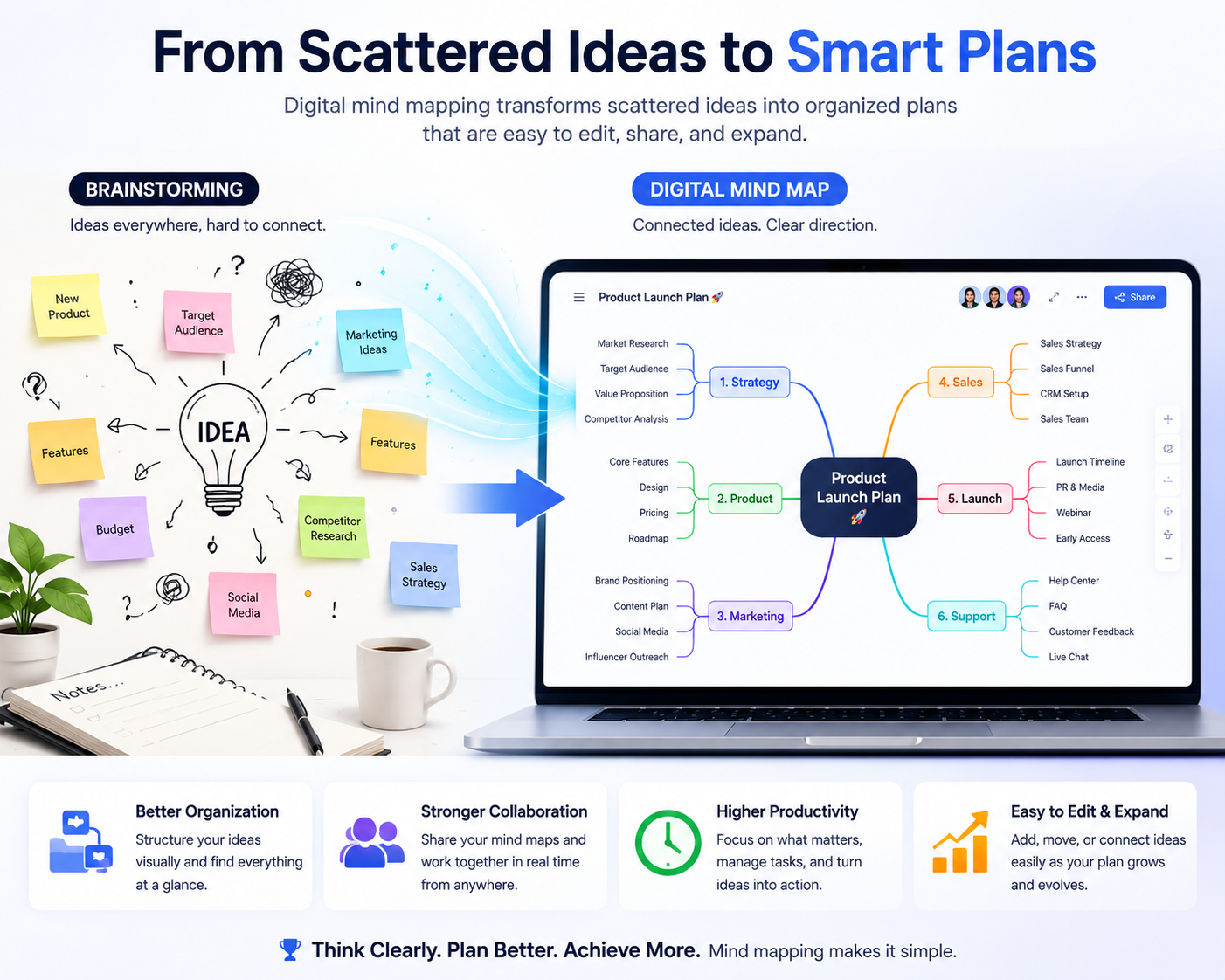
Mind mapping is a visual brainstorming technique that helps you organize ideas around a central topic. Instead of writing long lists or scattered notes, you begin with one main idea and expand outward by adding connected thoughts, subtopics, tasks, or concepts. This branching structure mirrors the way people naturally think, making it easier to explore ideas, discover relationships, and solve complex problems.
Unlike traditional note-taking, where information is stored in a linear format, mind maps encourage non-linear thinking. You can quickly add new ideas, reorganize branches, create connections between different topics, and expand your thinking without worrying about page layout or running out of space. This flexibility makes mind mapping useful for everything from quick brainstorming sessions to planning large projects.
Modern mind mapping software builds on this concept by allowing you to collaborate with others, attach files, add images, assign tasks, include notes, and even generate ideas using AI. As your project grows, your mind map grows with it, giving you a complete visual overview of your work in one place.
How a Mind Map Works
Every mind map begins with a single central idea. From there, you create major branches representing key topics. Each branch can then be divided into smaller ideas, creating a logical hierarchy that's easy to understand and expand.
When Should You Use Mind Mapping?
Mind maps are useful whenever you need to organize information, solve problems, or generate ideas. They're especially valuable during the early planning stages of a project because they help you explore possibilities before committing to a detailed plan.
| Situation | How Mind Mapping Helps |
|---|---|
| Brainstorming | Capture ideas quickly without worrying about structure. |
| Project Planning | Break large projects into manageable tasks and milestones. |
| Writing | Organize articles, books, reports, or presentations before drafting. |
| Studying | Visualize complex subjects and improve memory retention. |
| Team Collaboration | Allow multiple people to contribute ideas during meetings and workshops. |
| Problem Solving | Explore different solutions and understand how ideas connect. |
Benefits of Mind Mapping
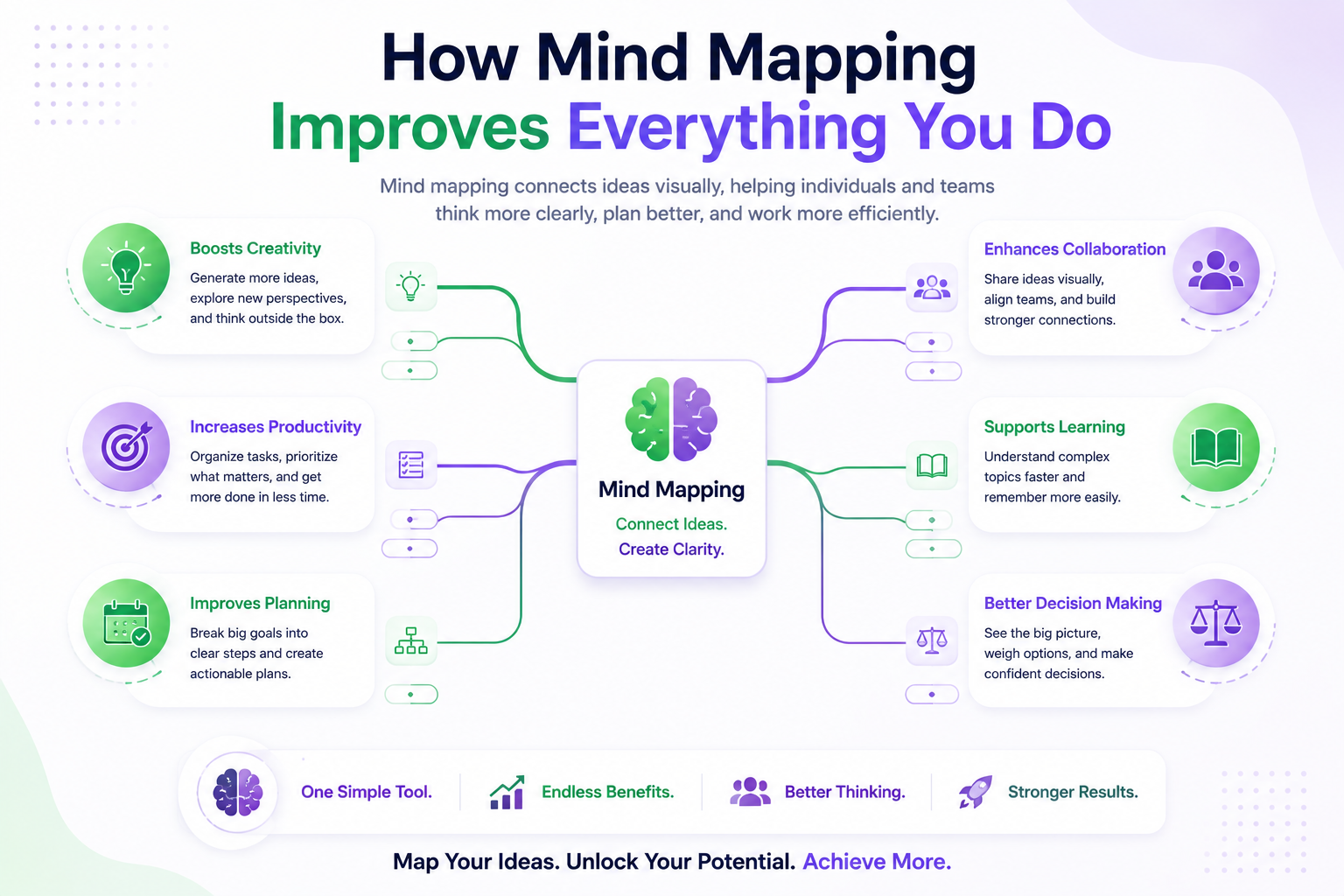
Mind mapping is much more than a brainstorming technique. It helps you organize information visually, making it easier to understand complex topics, identify relationships between ideas, and turn scattered thoughts into structured plans. Whether you're working alone or collaborating with a team, a well-designed mind map can improve clarity, reduce confusion, and help you make better decisions.
The biggest advantage of mind mapping is that it encourages you to think beyond linear notes. Instead of reading page after page of text, you can view an entire project, business strategy, or learning topic from a single visual perspective.
Generate Better Ideas
Ideas rarely appear in a perfect sequence. Mind maps allow you to capture thoughts as they come and connect them later. This free-flowing approach often leads to creative solutions that might never appear in a traditional outline or document.
Organize Complex Information
Large projects often involve dozens of ideas, tasks, and dependencies. Mind maps group related information into logical branches, making even complicated projects easier to understand and manage without feeling overwhelmed.
Improve Memory and Learning
Visual organization helps many people remember information more effectively than plain text. By combining keywords, colors, icons, and relationships between ideas, mind maps make studying and reviewing information faster and more engaging.
Plan Projects More Efficiently
Before starting a project, you can use a mind map to define objectives, break work into smaller tasks, identify risks, assign responsibilities, and estimate timelines. This creates a clear roadmap before any work begins.
Make Better Decisions
Seeing all available options in one visual structure makes comparing ideas much easier. You can identify missing information, weigh advantages and disadvantages, and understand how one decision may affect another part of your project.
Collaborate More Effectively
Modern mind mapping software allows multiple people to contribute simultaneously. Teams can brainstorm together, organize feedback, assign action items, and develop strategies without losing important ideas or creating duplicate work.
Increase Productivity
Instead of constantly switching between documents, spreadsheets, notes, and task lists, mind maps keep everything connected in one place. This reduces mental overload and helps you focus on completing work instead of searching for information.
Real-World Example
Imagine you're launching a new online business. Instead of maintaining separate notes for marketing, website development, branding, customer support, pricing, and product planning, a single mind map allows you to organize everything into connected branches. As your project grows, you can continue expanding each branch without losing sight of the overall strategy.
Who Should Use Mind Mapping Software?
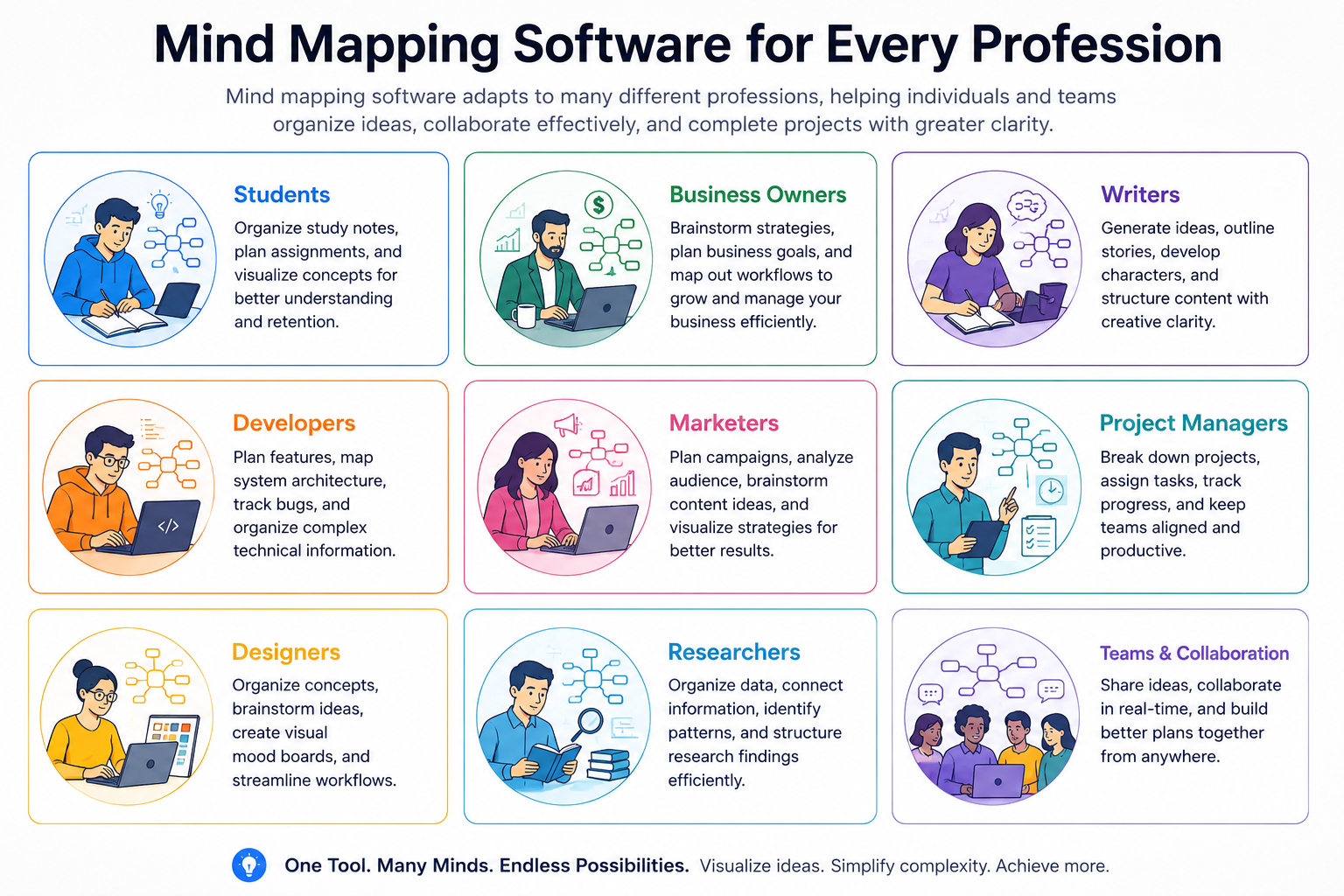
Mind mapping software isn't designed for one profession or industry. Almost anyone who needs to organize ideas, solve problems, plan projects, or manage information can benefit from visual thinking. Whether you're studying for exams, launching a startup, writing a book, or coordinating a team, mind maps help you see the bigger picture while keeping every detail organized.
Below are some of the people who gain the most value from mind mapping software and practical ways they can use it in their daily work.
Students
Students can organize lecture notes, summarize textbooks, prepare for exams, brainstorm essays, and connect complex concepts visually. Instead of memorizing long paragraphs, they can quickly review an entire subject using one structured diagram.
Business Owners
Entrepreneurs can plan business models, document workflows, create marketing strategies, organize product launches, map customer journeys, and develop long-term growth plans without juggling multiple documents.
Writers & Bloggers
Writers use mind maps to brainstorm article topics, organize chapters, build storylines, research keywords, and structure content before writing. A visual outline makes it easier to spot missing sections and improve the overall flow.
Marketing Teams
Marketing professionals can plan campaigns, organize content calendars, map customer funnels, track advertising ideas, and coordinate multi-channel marketing strategies across different departments.
Project Managers
Large projects involve many moving parts. Mind maps help project managers break work into phases, assign responsibilities, identify dependencies, monitor progress, and reduce the risk of overlooking important tasks.
Software Developers
Developers can map software architecture, organize features, plan APIs, document databases, identify technical dependencies, and visualize development roadmaps before writing code.
Designers
UI, UX, and graphic designers can brainstorm layouts, organize design systems, map user flows, collect inspiration, and structure creative projects before beginning detailed design work.
Researchers
Researchers often work with large amounts of information. Mind maps help categorize findings, connect related studies, organize references, develop hypotheses, and simplify complicated research topics.
Agencies & Teams
Agencies managing multiple clients can use mind maps to organize projects, document client requirements, plan campaigns, assign deliverables, and keep everyone aligned throughout the project lifecycle.
Is Mind Mapping Software Right for You?
If you regularly brainstorm ideas, plan projects, write content, solve complex problems, study large topics, or collaborate with others, mind mapping software can become one of your most valuable productivity tools. It reduces information overload, improves organization, and helps transform ideas into clear, actionable plans.
How We Tested the Best Mind Mapping Software
With dozens of mind mapping applications available today, choosing the right one isn't simply about finding the tool with the most features. The best software should make brainstorming faster, organizing ideas easier, and collaboration more efficient without adding unnecessary complexity. To help you compare different options fairly, we evaluated each application using the same practical criteria that matter most to everyday users.
Instead of focusing only on marketing claims, we looked at how each tool performs in real-world situations such as brainstorming projects, planning content, organizing research, collaborating with teams, and managing complex ideas over time.
Ease of Use
A mind mapping tool should help you think—not slow you down. We looked for clean interfaces, intuitive controls, keyboard shortcuts, drag-and-drop editing, and the ability to create and reorganize mind maps quickly without a steep learning curve.
Mind Mapping Features
We evaluated how well each application handles branching ideas, unlimited canvases, attachments, notes, relationships, icons, colors, templates, and other features that make organizing information easier.
Collaboration
Team collaboration has become increasingly important. We considered features such as real-time editing, comments, sharing permissions, version history, cloud synchronization, and support for remote teamwork.
AI Features
Many modern mind mapping tools now include AI capabilities. We looked at how useful these features are for brainstorming, generating ideas, summarizing information, expanding branches, and improving productivity rather than simply adding AI for marketing purposes.
Cross-Platform Support
People often switch between laptops, tablets, and smartphones throughout the day. We considered whether each application supports Windows, macOS, Linux, Android, iPhone, iPad, and web browsers while keeping projects synchronized across devices.
Export & Integration Options
Good mind maps should be easy to share and reuse. We evaluated export formats such as PDF, PNG, SVG, Word, Markdown, and presentation files, along with integrations for project management, cloud storage, and productivity platforms.
Pricing & Overall Value
Expensive software isn't always the best choice. We compared free plans, premium subscriptions, licensing models, included features, and overall value for students, professionals, teams, and businesses.
Evaluation Criteria at a Glance
| Category | What We Evaluated |
|---|---|
| Ease of Use | Interface, learning curve, shortcuts, workflow efficiency. |
| Core Features | Branches, notes, templates, attachments, customization. |
| Collaboration | Real-time editing, sharing, comments, permissions. |
| AI Capabilities | Brainstorming assistance, idea generation, summaries. |
| Device Support | Windows, macOS, Linux, iOS, Android, Web. |
| Export Options | PDF, PNG, SVG, Office formats, sharing. |
| Pricing | Free plans, premium features, long-term value. |
Best Mind Mapping Software in 2026
Every mind mapping application is built for a different type of user. Some focus on team collaboration, others prioritize speed, while a few offer powerful AI features or deep customization. Choosing the right software depends on how you plan to use it, the devices you work on, and whether you need collaboration, offline access, or project management features.
The comparison below highlights the most important differences between the leading mind mapping tools before we explore each one in detail.
| Software | Best For | AI | Collaboration | Offline | Free Plan | Rating |
|---|---|---|---|---|---|---|
| MindMeister | Team collaboration | ✓ | ★★★★★ | Limited | ✓ | 9.6/10 |
| Ayoa | AI & productivity | ✓ | ★★★★★ | Limited | ✓ | 9.5/10 |
| MindNode | Apple ecosystem | — | ★★★☆☆ | ✓ | ✓ | 9.3/10 |
| Xmind | Cross-platform users | ✓ | ★★★★☆ | ✓ | ✓ | 9.4/10 |
| QuikFlow | Fast organization | — | ★★☆☆☆ | ✓ | ✓ | 8.9/10 |
| MindMup | Simplicity | — | ★★★☆☆ | — | ✓ | 8.8/10 |
MindMeister

Overview
MindMeister is one of the most popular cloud-based mind mapping applications available today. It's designed for individuals, educators, remote teams, and businesses that need an easy way to brainstorm, organize ideas, and collaborate in real time. Since everything is stored online, multiple people can work on the same mind map simultaneously without creating conflicting versions.
Beyond basic mind mapping, MindMeister also integrates with task management tools, making it useful for turning brainstorming sessions into actionable project plans. If collaboration is your highest priority, it's one of the strongest options currently available.
Why We Recommend It
We recommend MindMeister because it combines an intuitive interface with powerful collaboration features. Teams can brainstorm together, leave comments, assign ideas, and continue improving projects without constantly exchanging documents or screenshots. It strikes an excellent balance between simplicity and professional features.
Best For
MindMeister is ideal for businesses, remote teams, educators, agencies, project managers, consultants, and anyone who frequently collaborates with other people during brainstorming or project planning sessions.
Key Features
- Real-time team collaboration.
- Unlimited branching and visual organization.
- Comments and discussion features.
- Task management integration.
- Cloud synchronization.
- Presentation mode.
- Export to PDF and image formats.
- Multiple layout and customization options.
Pros
- Excellent collaboration experience.
- Clean and beginner-friendly interface.
- Reliable cloud syncing.
- Great for workshops and brainstorming meetings.
- Professional presentation capabilities.
Cons
- Several advanced features require a paid subscription.
- Offline functionality is limited compared to desktop-first applications.
- Can become expensive for larger teams.
Pricing
A free plan is available with limited mind maps. Paid plans unlock unlimited projects, advanced collaboration, exports, integrations, and additional productivity features. Pricing may change over time, so always check the official website for the latest plans.
Supported Platforms
Web, Windows (browser), macOS (browser), Linux (browser), iPhone, iPad, and Android.
Our Rating
⭐⭐⭐⭐⭐ 9.6 / 10
Final Verdict
If your priority is brainstorming with colleagues, clients, or students, MindMeister is one of the strongest choices available. Its collaborative workflow, polished interface, and project planning capabilities make it an excellent investment for teams that regularly organize ideas together. Individual users can also benefit from its simplicity, although they may find desktop-focused alternatives more suitable if offline work is essential.
Ayoa

Overview
Ayoa is much more than a traditional mind mapping application. It combines visual brainstorming, AI-assisted idea generation, task management, whiteboards, and team collaboration into a single productivity platform. Instead of switching between multiple applications to brainstorm, assign work, and track progress, Ayoa lets you manage everything from one workspace.
The platform is particularly useful for businesses and creative teams that want to move seamlessly from brainstorming ideas to executing projects. Its built-in AI tools can also help generate new concepts, summarize information, and overcome creative blocks, making it one of the most innovative mind mapping solutions available today.
Why We Recommend It
We recommend Ayoa because it bridges the gap between brainstorming and project execution. Many mind mapping tools stop after helping you organize ideas, but Ayoa allows you to transform those ideas into actionable tasks, collaborate with teammates, and monitor progress without leaving the platform. For businesses and remote teams, this all-in-one approach can significantly improve productivity.
Best For
Ayoa is best suited for project managers, remote teams, marketing agencies, business owners, educators, consultants, creative professionals, and organizations looking for a combination of mind mapping, collaboration, AI, and task management.
Key Features
- AI-powered brainstorming and idea generation.
- Interactive mind maps and whiteboards.
- Visual task management with Kanban boards.
- Real-time collaboration and commenting.
- Built-in project planning tools.
- Custom templates for business, education, and creativity.
- Cloud synchronization across devices.
- Presentation mode and multiple export options.
Pros
- Excellent AI-assisted brainstorming tools.
- Combines mind mapping with project management.
- Beautiful and modern interface.
- Strong collaboration features for remote teams.
- Suitable for both creative and business workflows.
Cons
- Premium features require a subscription.
- Can feel overwhelming for users who only need simple mind maps.
- Some advanced collaboration features have a learning curve.
Pricing
Ayoa offers a free plan for getting started, while premium subscriptions unlock AI capabilities, advanced collaboration, additional storage, project management tools, and enhanced customization. Since pricing may change, it's best to visit the official website for the latest plans and feature comparisons.
Supported Platforms
Windows, macOS, Web, Android, iPhone, and iPad.
Our Rating
⭐⭐⭐⭐⭐ 9.5 / 10
Final Verdict
If you're searching for a productivity platform that combines mind mapping, artificial intelligence, collaboration, and project management, Ayoa is one of the strongest options available. While it may include more features than casual users need, it's an excellent choice for professionals and teams that want to brainstorm ideas, organize projects, and execute work without constantly switching between different applications.
MindNode

Overview
MindNode is a premium mind mapping application built specifically for the Apple ecosystem. It's designed for users who value simplicity, speed, and an elegant interface without sacrificing powerful brainstorming capabilities. Whether you're organizing personal ideas, planning projects, writing articles, or studying for exams, MindNode provides a distraction-free environment that makes visual thinking feel natural.
Unlike some enterprise-focused platforms, MindNode focuses on creating an enjoyable user experience. Features such as visual tags, folding branches, focus mode, and seamless synchronization across Apple devices make it a favorite among students, professionals, writers, and creative thinkers.
Why We Recommend It
We recommend MindNode because it's one of the easiest mind mapping applications to learn while still offering enough features for serious planning. If you already use a Mac, iPhone, or iPad, the seamless synchronization and polished interface provide one of the best mind mapping experiences available.
Best For
MindNode is ideal for Apple users, students, writers, bloggers, entrepreneurs, designers, content creators, educators, freelancers, and professionals who prefer a clean and intuitive workspace over complex enterprise software.
Key Features
- Clean and intuitive drag-and-drop interface.
- Visual tags for organizing ideas.
- Focus Mode to concentrate on a single branch.
- Collapsible branches for managing large mind maps.
- Task tracking with progress indicators.
- Quick Entry for rapidly capturing ideas.
- Automatic synchronization via iCloud.
- Export to PDF, PNG, Markdown, OPML, and other formats.
Pros
- One of the best-designed mind mapping interfaces available.
- Excellent performance on Mac, iPhone, and iPad.
- Very beginner-friendly.
- Fast synchronization across Apple devices.
- Works well both online and offline.
Cons
- Not available for Windows or Linux.
- Team collaboration features are more limited than cloud-first competitors.
- Advanced business workflow features are limited compared to enterprise platforms.
Pricing
MindNode offers a free version with essential mind mapping features. Premium subscriptions unlock advanced visual themes, enhanced task management, Focus Mode, unlimited mind maps, and additional export options. Check the official website for the latest pricing details.
Supported Platforms
macOS, iPhone, iPad, Apple Vision Pro, and Apple Watch.
Our Rating
⭐⭐⭐⭐⭐ 9.3 / 10
Final Verdict
If you're fully invested in Apple's ecosystem, MindNode is one of the best mind mapping applications you can choose. Its elegant design, smooth performance, and thoughtful productivity features make brainstorming enjoyable rather than overwhelming. While it isn't the best choice for large cross-platform teams, it's an outstanding option for individuals and Apple-based professionals looking for a fast, reliable, and beautifully designed mind mapping tool.
Xmind

Overview
Xmind has been one of the most trusted names in mind mapping for many years and is widely used by students, professionals, entrepreneurs, and creative teams. It combines a polished interface with powerful visualization tools, making it suitable for everything from simple brainstorming sessions to managing large, complex projects.
Unlike many browser-only solutions, Xmind offers excellent desktop applications while also supporting cloud synchronization across devices. Its balance of performance, customization, and ease of use makes it one of the strongest all-around mind mapping applications available today.
Why We Recommend It
We recommend Xmind because it delivers an excellent combination of speed, flexibility, and professional features. Whether you're creating study notes, planning a product launch, organizing research, or building a business strategy, Xmind scales well from personal projects to enterprise-level planning.
Best For
Students, business owners, project managers, consultants, researchers, software developers, educators, and anyone looking for a feature-rich mind mapping application that works across multiple operating systems.
Key Features
- Professional mind mapping layouts.
- AI-powered brainstorming assistance.
- Fishbone, logic chart, tree chart, and timeline diagrams.
- Task markers, priorities, labels, and notes.
- Presentation mode.
- Beautiful themes and customization.
- Cloud synchronization.
- Export to PDF, PNG, SVG, Markdown, Word, Excel, and more.
Pros
- Excellent balance between simplicity and advanced features.
- Fast performance even on large mind maps.
- Beautiful templates and themes.
- Works on Windows, macOS, Linux, Android, iPhone, and iPad.
- Supports many export formats.
Cons
- Some premium features require a paid subscription.
- Real-time collaboration is not as strong as dedicated cloud-first competitors.
- Advanced customization may take time for beginners to learn.
Pricing
Xmind offers a free version with essential features. Premium plans unlock advanced export options, AI tools, cloud synchronization, presentation features, and additional templates. Visit the official website for the latest pricing information.
Supported Platforms
Windows, macOS, Linux, Android, iPhone, iPad, and Web.
Our Rating
⭐⭐⭐⭐⭐ 9.7 / 10
Final Verdict
If you're looking for a powerful mind mapping application that works equally well for personal productivity, education, and professional projects, Xmind is one of the best choices available. Its rich feature set, attractive interface, strong cross-platform support, and flexible export options make it an excellent long-term investment for almost any type of user.
QuikFlow

Overview
QuikFlow is designed for people who want to capture ideas quickly without spending time arranging branches manually. Instead of offering dozens of advanced customization options, it focuses on speed, simplicity, and keeping every mind map neat as it grows. It's an excellent choice for solo brainstorming sessions where getting ideas onto the screen quickly is more important than designing complex diagrams. :contentReference[oaicite:0]{index=0}
The application sits somewhere between a traditional mind mapping tool and a lightweight flowchart application. As you add new nodes or relationships, QuikFlow automatically reorganizes the layout, helping you maintain a clean structure without constant manual adjustments. :contentReference[oaicite:1]{index=1}
Why We Recommend It
We recommend QuikFlow for users who value speed over complexity. If your goal is to brainstorm ideas, organize concepts, or create structured diagrams in minutes, its automatic layout engine removes much of the manual work required by traditional mind mapping software. It's also one of the most affordable premium options in this category. :contentReference[oaicite:2]{index=2}
Best For
Solo professionals, students, content creators, writers, business owners, and anyone who wants to build organized mind maps quickly without learning a feature-heavy application.
Key Features
- Automatic layout adjustment as ideas are added.
- Unlimited nodes and connectors.
- Simple drag-and-drop editing.
- Interactive layout engine.
- Clean and distraction-free interface.
- Rich content support in the Pro version.
- Interactive task creation in paid plans.
Pros
- Very easy to learn.
- Automatically keeps mind maps organized.
- Affordable premium pricing.
- Fast performance when brainstorming.
- Excellent for creating clean diagrams with minimal effort.
Cons
- Free version has limited customization.
- No web application.
- Less flexible than some feature-rich competitors.
- Not ideal for large teams requiring real-time collaboration.
Pricing
QuikFlow offers a limited free plan. Paid plans start at approximately $1.99 per month, and a lifetime license is also available, making it one of the most affordable premium mind mapping applications. Pricing may change, so check the official website for the latest details. :contentReference[oaicite:3]{index=3}
Supported Platforms
Windows and macOS.
Our Rating
⭐⭐⭐⭐☆ 8.9 / 10
Final Verdict
QuikFlow is a great option if your priority is creating organized mind maps as quickly as possible. Its automatic layout system, lightweight interface, and affordable pricing make it especially appealing for individuals who brainstorm frequently. If you need advanced collaboration, extensive customization, or a web-based workspace, other tools may be a better fit. However, for fast and structured idea organization, QuikFlow delivers excellent value for the price. :contentReference[oaicite:4]{index=4}
MindMup

Overview
MindMup is a lightweight, browser-based mind mapping application designed for users who want to start organizing ideas without installing software or learning a complicated interface. Everything happens directly in your web browser, allowing you to create, edit, and share mind maps from almost any device with an internet connection.
Unlike feature-heavy enterprise platforms, MindMup focuses on speed and simplicity. It removes unnecessary complexity so you can concentrate on brainstorming, planning, and visualizing ideas instead of configuring dozens of settings.
Why We Recommend It
We recommend MindMup because it's one of the easiest mind mapping tools for beginners. If you need to quickly capture ideas, organize notes, prepare presentations, or create simple project plans, MindMup lets you start working within seconds without downloading additional software.
Best For
Students, teachers, bloggers, writers, freelancers, small business owners, and anyone looking for a simple online mind mapping solution without a steep learning curve.
Key Features
- Works entirely in your web browser.
- Clean and beginner-friendly interface.
- Unlimited branching for organizing ideas.
- Keyboard shortcuts for faster mind mapping.
- Easy sharing and collaboration.
- Publish mind maps online.
- Export to PDF, PNG, and other popular formats.
- Google Drive integration for saving projects.
Pros
- No installation required.
- Very fast and lightweight.
- Simple interface that's easy to learn.
- Accessible from almost any computer with a browser.
- Suitable for education and everyday brainstorming.
Cons
- Fewer advanced features than premium competitors.
- Limited customization for complex projects.
- Not ideal for large enterprise teams.
- Requires an internet connection for the best experience.
Pricing
MindMup offers a free plan for creating basic mind maps, while paid plans provide larger maps, cloud storage, advanced publishing options, and additional collaboration features. Visit the official website for the latest pricing and plan details.
Supported Platforms
Web Browser (Windows, macOS, Linux, ChromeOS, and other modern browsers).
Our Rating
⭐⭐⭐⭐☆ 8.8 / 10
Final Verdict
MindMup is an excellent choice for anyone who values simplicity, speed, and accessibility. While it doesn't offer the extensive feature set of enterprise-focused applications like Xmind or Ayoa, it excels at helping users brainstorm, organize ideas, and create clean mind maps with minimal effort. If you need a lightweight, browser-based tool that works almost anywhere, MindMup is a dependable option worth considering.
Real-World Mind Mapping Examples
Understanding how mind mapping works is much easier when you see practical examples. Whether you're planning a blog post, launching a business, preparing for an exam, or organizing a product launch, a mind map helps transform scattered thoughts into a clear visual structure. Instead of wondering what to do next, you can see every stage of your project in one place and identify the relationships between different tasks.
The examples below demonstrate how mind maps can simplify different types of work. While every project is unique, these templates provide a useful starting point that you can expand with your own ideas, notes, deadlines, and resources.
Example 1: Planning a Blog Post
Content creators often manage dozens of ideas at once. A mind map helps organize the entire writing process—from researching keywords to publishing the finished article—so nothing gets overlooked.
Example 2: Starting a Business
Starting a business involves many connected decisions. A mind map lets you visualize every major step, making it easier to plan your launch without missing important tasks.
Example 3: Studying for Exams
Students can simplify complex subjects by breaking them into smaller topics. Instead of reading hundreds of pages repeatedly, a visual map provides a quick overview that's much easier to review before exams.
Example 4: Planning a Product Launch
Product launches require coordination between research, design, marketing, sales, and customer support. A mind map gives every team member a clear understanding of how each stage connects to the next.
Mind Mapping vs. Flowcharts
Mind maps and flowcharts are both visual thinking tools, but they solve different problems. Although they may appear similar at first glance, they're designed for completely different purposes. Choosing the right one depends on whether you're trying to generate ideas or document a structured process.
A simple way to remember the difference is this: mind maps help you explore possibilities, while flowcharts help you explain a sequence of actions. Understanding this distinction allows you to select the right diagram for every project.
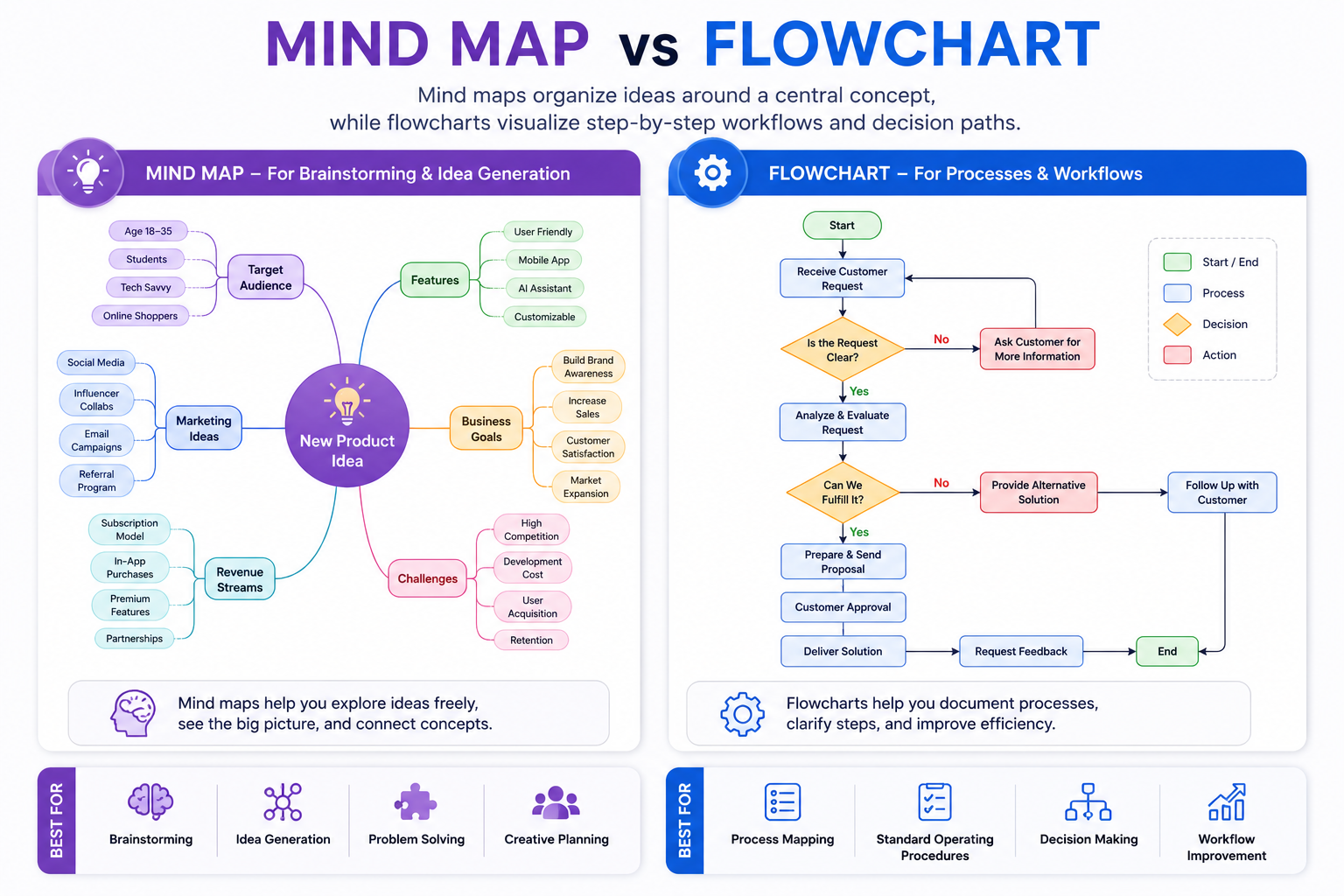
Key Differences
| Mind Mapping | Flowcharts |
|---|---|
| Generates and organizes ideas. | Documents step-by-step workflows. |
| Starts with one central topic. | Starts with a defined process or action. |
| Flexible and non-linear. | Sequential and logical. |
| Best for brainstorming and planning. | Best for documenting procedures. |
| Encourages creativity. | Focuses on accuracy and decision paths. |
| Ideas can branch in multiple directions. | Steps usually follow one direction. |
When Should You Use a Mind Map?
Use a mind map whenever you're collecting ideas, planning a project, outlining an article, studying for exams, organizing research, or solving open-ended problems. Mind maps are excellent when the final structure isn't yet known because they allow ideas to grow naturally.
When Should You Use a Flowchart?
Flowcharts are better suited for documenting business processes, customer journeys, manufacturing procedures, software logic, approval workflows, troubleshooting guides, and decision trees. If someone needs to follow a repeatable sequence of actions, a flowchart is usually the better choice.
Can You Use Both Together?
Absolutely. Many professionals begin with a mind map to brainstorm ideas and explore possibilities. Once those ideas are finalized, they convert the plan into a flowchart that documents the exact steps required to complete the work. This combination is especially useful for business planning, software development, product launches, and process documentation.
Best Practices for Better Mind Maps
A mind map should help you think more clearly—not create more confusion. While most mind mapping software makes it easy to add unlimited branches and ideas, the most effective mind maps are usually the simplest ones. Following a few proven best practices will make your maps easier to understand, easier to update, and more useful over the long term.
Start with One Clear Central Idea
Every effective mind map begins with a single, well-defined topic. Whether you're planning a business, writing a blog post, or studying for an exam, place the main subject in the center of your map. Everything else should branch naturally from this core idea, making it easier to maintain focus and avoid unnecessary distractions.
Use Short Keywords Instead of Long Sentences
Each branch should contain concise keywords or short phrases rather than full paragraphs. Short labels are easier to scan, improve readability, and allow your brain to recognize relationships between ideas much faster than blocks of text.
Keep Branches Clear and Organized
Avoid creating overly complicated branches with dozens of nested ideas. If one section becomes too large, consider creating a separate mind map dedicated to that topic. Smaller, organized branches are easier to understand and update over time.
Group Related Ideas Together
Organize similar ideas into logical categories instead of placing them randomly throughout the map. Grouping related concepts makes navigation easier and helps reveal connections that might otherwise go unnoticed.
Use Colors, Icons, and Visual Cues
Visual elements make mind maps easier to understand at a glance. Use different colors to separate categories, icons to highlight priorities or completed tasks, and images where appropriate to improve memory and make large maps easier to navigate.
Review and Refine Your Mind Maps Regularly
A mind map should evolve as your project or knowledge grows. Schedule regular reviews to remove outdated ideas, reorganize branches, add new information, and simplify sections that have become unnecessarily complex. Continuous refinement keeps your maps accurate, relevant, and useful.
Better Mind Mapping Checklist
| Best Practice | Completed |
|---|---|
| Started with one central idea. | ☐ |
| Used short keywords instead of paragraphs. | ☐ |
| Kept branches simple and organized. | ☐ |
| Grouped related ideas together. | ☐ |
| Used colors or icons to improve readability. | ☐ |
| Reviewed and updated the mind map regularly. | ☐ |
Free Mind Mapping Templates & Resources
Starting with a blank canvas isn't always easy. To help you brainstorm faster, we've created several ready-to-use mind mapping templates. Simply copy one of the templates below and paste it into your favorite mind mapping software, note-taking app, or document editor. You can then customize it to fit your own project.
These templates are intentionally simple so they're easy to expand regardless of whether you use Xmind, MindMeister, Ayoa, MindNode, or another mind mapping application.
Business Planning Template
Business Idea
├── Target Audience
├── Market Research
├── Products / Services
├── Pricing
├── Branding
├── Website
├── Marketing
│   ├── SEO
│   ├── Social Media
│   ├── Email Marketing
│   └── Paid Ads
├── Sales
├── Customer Support
├── Budget
└── Launch Plan
Blog Planning Template
Blog Topic
├── Target Keyword
├── Search Intent
├── Competitor Research
├── Outline
│   ├── Introduction
│   ├── H2 Sections
│   ├── Examples
│   └── FAQ
├── Images
├── Internal Links
├── SEO Optimization
├── Publish
└── Promotion
Study Notes Template
Subject
├── Chapter 1
│   ├── Key Concepts
│   ├── Important Definitions
│   ├── Formulas
│   ├── Examples
│   └── Practice Questions
├── Chapter 2
├── Chapter 3
├── Diagrams
├── Common Mistakes
├── Revision Notes
├── Previous Exam Questions
└── Final Revision Checklist
Product Roadmap Template
Product Vision
├── Customer Problems
├── Market Research
├── Features
│   ├── MVP
│   ├── Version 1.0
│   ├── Version 2.0
│   └── Future Features
├── UI / UX Design
├── Development
├── Testing
├── Marketing
├── Launch
├── Customer Feedback
└── Future Improvements
Website Planning Template
Website Project
├── Goals
├── Target Audience
├── Branding
├── Sitemap
│   ├── Home
│   ├── About
│   ├── Services
│   ├── Blog
│   ├── Contact
│   └── FAQ
├── Content
├── Images
├── SEO
├── Performance
├── Analytics
└── Launch Checklist
Marketing Campaign Template
Campaign Goal
├── Target Audience
├── Customer Pain Points
├── Value Proposition
├── Marketing Channels
│   ├── SEO
│   ├── Email
│   ├── Facebook
│   ├── Instagram
│   ├── LinkedIn
│   └── Google Ads
├── Content Plan
├── Budget
├── KPIs
├── Launch
└── Performance Analysis
Book Writing Template
Book Idea
├── Target Readers
├── Purpose
├── Table of Contents
│   ├── Introduction
│   ├── Chapter 1
│   ├── Chapter 2
│   ├── Chapter 3
│   ├── Chapter 4
│   └── Conclusion
├── Research
├── Examples
├── Case Studies
├── Editing
├── Cover Design
├── Publishing
└── Marketing Strategy
Final Thoughts
Mind mapping is more than just a way to organize ideas—it's a practical thinking framework that helps you solve problems, make better decisions, and turn complex projects into manageable tasks. Whether you're planning a business, writing a book, studying for exams, managing a marketing campaign, or leading a team, visual thinking allows you to see the complete picture while keeping every important detail connected.
The best mind mapping software isn't necessarily the one with the longest feature list. It's the one that fits your workflow, supports the devices you use every day, and helps you think more clearly without getting in your way. Some people need powerful collaboration features for remote teams, while others simply want a fast and distraction-free workspace for organizing personal ideas. Understanding your own requirements will help you choose the right tool with confidence.
Don't worry about creating the perfect mind map on your first attempt. Start with a single central idea, add a few branches, and continue refining your map as new ideas emerge. The most valuable mind maps evolve over time—they're updated, expanded, and reorganized as your knowledge and projects grow.
If you're new to mind mapping, begin with one of the free templates provided in this guide. They're designed to help you skip the blank page and start organizing your thoughts immediately. As you become more comfortable with the process, you'll naturally develop your own structure, workflow, and style that works best for you.
As your mind maps grow, remember to keep them organized and easy to read. Export important maps regularly, collaborate with teammates when needed, and review older maps to identify ideas that can still be improved or turned into real projects. A well-maintained mind map often becomes a valuable knowledge base that continues to provide value long after the initial brainstorming session.
We hope this guide has helped you understand not only which mind mapping software is worth considering, but also how to use mind mapping more effectively in your daily work. With the right tool and a structured approach, you'll spend less time organizing information and more time turning great ideas into meaningful results.
Choose the software that matches your workflow, start with a simple mind map, and keep improving it as your ideas evolve. Small, consistent improvements often lead to the biggest breakthroughs—and every successful project begins with a single well-organized idea.