
Introduction
If you've been searching for ways to grow your blog without relying entirely on Google or paying for ads, you've probably heard people recommend Pinterest. But many beginners are confused about what Pinterest actually is. Is it a social media platform? Can you write blog posts directly on Pinterest? Or is it simply a place to save inspiring images? These questions often prevent new bloggers from taking advantage of one of the largest sources of free, long-term website traffic available today.
The truth is that Pinterest isn't a blogging platform—it's a visual discovery and search engine that helps people find ideas, tutorials, products, recipes, travel guides, home inspiration, and millions of other pieces of content. Instead of publishing full blog posts on Pinterest, bloggers create visually appealing Pins that link back to articles on their own websites. When users discover and click those Pins, they visit the blog, creating valuable organic traffic that can continue growing for months or even years.
Unlike many social media platforms where posts disappear from people's feeds within hours, Pinterest content has a much longer lifespan. A single well-optimized Pin can continue appearing in search results and recommendations long after it's published, making Pinterest one of the most effective traffic sources for evergreen blog content. This is why thousands of bloggers, businesses, creators, and online entrepreneurs use Pinterest as part of their long-term content marketing strategy.
In this beginner-friendly guide, you'll learn exactly how Pinterest blogging works, how to create a Pinterest Business account, choose the right niche, write blog posts people actually search for, design high-converting Pins, optimize your content for Pinterest SEO, grow your traffic consistently, and avoid the most common mistakes that slow down new bloggers.
Whether you're starting your very first blog or looking for another reliable source of organic visitors, this guide will give you a step-by-step roadmap for using Pinterest to attract readers, grow your audience, and build long-term traffic without depending entirely on search engines or paid advertising.
Can You Blog on Pinterest?
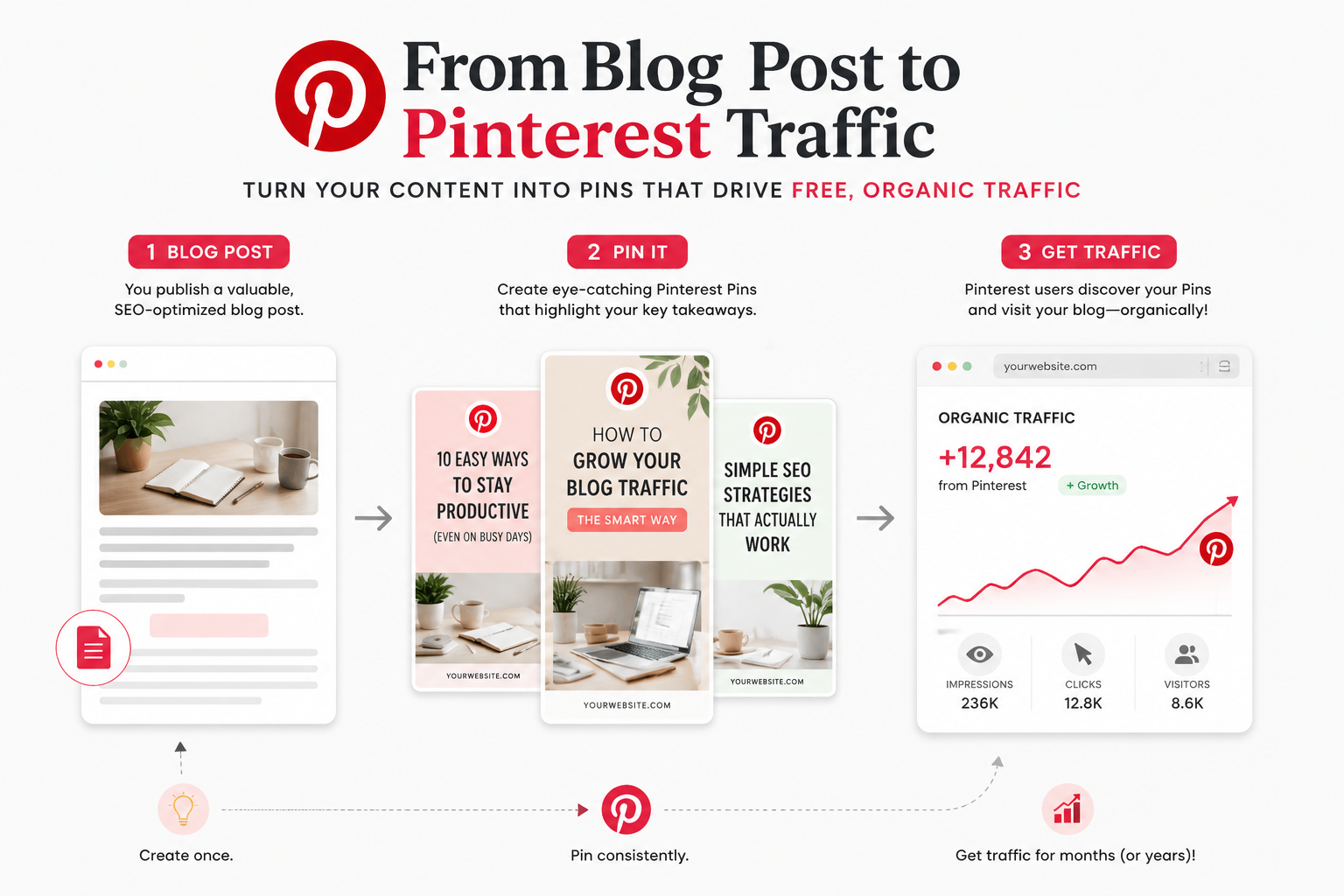
Yes—but not in the way many beginners expect. You cannot publish full-length blog articles directly on Pinterest like you would on WordPress, Medium, or Blogger. Instead, Pinterest acts as a discovery platform where people search for ideas and click Pins that lead them to content on external websites. If you own a blog, Pinterest can become one of your largest sources of free, long-term traffic by connecting interested readers with your articles.
Think of Pinterest as a bridge between people searching for answers and the helpful content you've created. Every Pin you publish should encourage users to click through to a valuable article rather than trying to explain everything within the Pin itself.
Is Pinterest a Blogging Platform?
No. Pinterest is not a blogging platform or website builder. It doesn't host long-form articles, manage categories, or replace your blog. Instead, it stores visual bookmarks called Pins that link users to useful resources across the internet. These Pins can point to blog posts, recipes, online stores, videos, tutorials, printable resources, or almost any type of valuable content.
This means your blog remains the primary place where readers consume your content, while Pinterest acts as a powerful traffic source that introduces new people to your website every day.
How Pinterest Works Like a Search Engine
Many people compare Pinterest to Instagram or Facebook, but it behaves much more like a search engine. Users actively search for specific topics such as "healthy dinner recipes," "small business ideas," "SEO checklist," or "living room decorating tips." Pinterest analyzes keywords, Pin titles, descriptions, boards, and user engagement to determine which Pins should appear in search results.
Because Pinterest relies heavily on search intent, creating keyword-rich Pins and publishing helpful blog content can continue driving visitors for months or even years. Unlike social media posts that disappear quickly, successful Pins often gain momentum over time as more people discover, save, and share them.
The Relationship Between Pinterest and Your Blog
Your blog and Pinterest work together rather than competing with each other. Your blog provides detailed, high-quality information that solves readers' problems, while Pinterest helps people discover that content. The more useful your articles are, the more likely visitors are to stay longer, share your content, and return to your website in the future.
A successful Pinterest strategy usually follows a simple workflow. You publish a helpful blog post, design one or more attractive Pins for that article, optimize each Pin with relevant keywords, and publish them to carefully organized Pinterest boards. As people search for related topics, your Pins begin appearing in search results and can generate a steady stream of organic traffic.
| Your Blog | |
|---|---|
| Publishes complete articles. | Helps people discover those articles. |
| Builds authority and trust. | Generates free organic traffic. |
| Monetizes visitors through ads, affiliates, products, or services. | Sends interested visitors to your website. |
Why Bloggers Use Pinterest
Most bloggers eventually discover that relying on a single traffic source is risky. Search engine rankings change, social media algorithms evolve, and paid advertising isn't always affordable for beginners. Pinterest offers another way to attract visitors by helping people discover useful content through visual search. Unlike traditional social platforms where posts quickly disappear, Pinterest content can continue generating traffic for months or even years after it's published.
This long-term visibility is one of the biggest reasons bloggers invest time in Pinterest. Instead of constantly creating new content just to stay visible, one high-quality article supported by several well-designed Pins can continue attracting readers long after publication.
Why Pinterest Is So Valuable for Bloggers
Pinterest offers several advantages that make it different from many other traffic sources. Rather than rewarding viral content that disappears within days, Pinterest focuses on relevance and search intent. This gives well-written blog posts a much longer opportunity to reach new audiences.
| Benefit | Why It Matters |
|---|---|
| Free Organic Traffic | Well-optimized Pins can continuously send visitors to your blog without paying for advertising. |
| Long Lifespan | Pins often remain discoverable for months or even years, unlike most social media posts. |
| High Purchase Intent | Many Pinterest users actively search for products, tutorials, services, and buying guides before making decisions. |
| Evergreen Content | Helpful articles continue receiving traffic long after publication when they answer common questions. |
Pinterest vs Traditional Social Media
Many beginners expect Pinterest to work like Instagram or Facebook, but the platforms have very different goals. Social networks focus on recent posts and follower engagement, while Pinterest focuses on helping users discover useful content through search. This makes Pinterest especially valuable for bloggers publishing evergreen articles.
| Typical Social Media | |
|---|---|
| Search-driven discovery. | Feed-driven content. |
| Pins can rank for months or years. | Posts often lose visibility within days. |
| Users actively search for solutions. | Users primarily browse entertainment and updates. |
| Excellent for evergreen blog traffic. | Better for community engagement and conversations. |
What You Need Before Starting
One of the biggest misconceptions about Pinterest blogging is that you can create an account, publish a few Pins, and immediately start receiving thousands of visitors. In reality, Pinterest works best when it becomes part of a complete blogging strategy. Before you begin publishing Pins, make sure you have the right foundation in place. Spending time preparing these essentials will make your Pinterest marketing far more effective in the long run.
Fortunately, you don't need expensive software or a large team. Most successful Pinterest bloggers started with a simple website, a clear niche, and helpful content that solved real problems. Focus on building these fundamentals before worrying about traffic numbers.
Your Pinterest Blogging Checklist
| Requirement | Why It Matters |
|---|---|
| A Blog or Website | Pinterest sends visitors to your website, not to blog posts hosted on Pinterest itself. Your website is where readers consume your content, join your email list, purchase products, or become customers. |
| Pinterest Business Account | A Business account provides analytics, website verification, advertising options, and additional tools that help you understand which Pins generate the most traffic. |
| A Clear Niche | Focusing on one primary topic helps Pinterest understand your content and makes it easier for the right audience to discover your Pins through search. |
| High-Quality Blog Content | Attractive Pins may earn clicks, but valuable articles are what encourage visitors to stay, subscribe, share your content, and return in the future. |
Don't Chase Traffic Before Building Value
Many beginners spend hours designing beautiful Pins before they've published enough helpful blog posts. A better strategy is to create valuable content first and then use Pinterest to help people discover it. Every Pin should lead to an article that genuinely answers a question, teaches a skill, or solves a problem.
As a simple goal, try publishing at least 10–20 high-quality blog posts before expecting consistent Pinterest traffic. This gives visitors multiple reasons to explore your website and increases the number of Pins you can create over time. The more useful content you publish, the stronger your long-term Pinterest strategy becomes.
Step 1: Create a Pinterest Business Account
Before publishing your first Pin, the most important step is setting up a Pinterest Business account. While a personal account allows you to browse and save ideas, a Business account provides professional tools that help bloggers understand their audience, measure traffic, optimize content, and grow more effectively. The good news is that creating one is completely free and only takes a few minutes.
If you already have a personal Pinterest account, you don't need to start over. Pinterest allows you to convert an existing personal account into a Business account while keeping your saved Pins and boards.
Personal Account vs Business Account
| Personal Account | Business Account |
|---|---|
| Save and organize Pins. | Everything in a personal account plus business tools. |
| No website analytics. | Access Pinterest Analytics to measure traffic and engagement. |
| Limited marketing features. | Access business profile features and advertising tools. |
| No website verification. | Verify your website to build trust and improve analytics. |
| Better for casual users. | Best for bloggers, businesses, creators, and marketers. |
Set Up Your Profile Properly
Your profile helps Pinterest understand your niche and gives visitors confidence when they discover your content. Choose a professional profile photo, write a short keyword-rich bio explaining what you publish, and use your real blog or brand name whenever possible. A complete profile looks more trustworthy and makes it easier for users to decide whether to follow your account.
Add and Verify Your Website
Your blog should be connected to your Pinterest Business account before you publish your first Pin. Adding your website allows Pinterest users to visit your articles directly, while website verification confirms that you own the domain. Verified websites also receive more detailed analytics, helping you understand which Pins generate the most clicks and engagement.
Verification usually involves adding a small HTML tag or uploading a verification file to your website. Most blogging platforms such as WordPress make this process straightforward, and it only needs to be completed once.
Before You Move to the Next Step
- ✅ Create or convert to a Pinterest Business account.
- ✅ Upload a professional profile photo.
- ✅ Write a clear, keyword-focused profile description.
- ✅ Add your blog or website URL.
- ✅ Verify your website ownership.
- ✅ Make sure your profile represents your blog niche clearly.
Once your Business account is fully configured, you're ready to decide what type of content you'll publish. Choosing a clear niche is one of the biggest factors that determines whether Pinterest understands your account and recommends your Pins to the right audience.
Step 2: Choose Your Blog Niche
One of the biggest reasons new Pinterest bloggers struggle isn't because they're using the wrong keywords or creating poor-quality Pins—it's because they try to write about everything. A clear niche helps Pinterest understand what your content is about, makes it easier for readers to trust your expertise, and increases the chances of your Pins appearing in relevant search results.
Your niche doesn't have to be extremely narrow, but it should focus on a specific audience with consistent interests. When someone visits your website after clicking a Pin, they should immediately recognize what your blog specializes in and find more content related to the topic they originally searched for.
How to Choose the Right Niche
Before choosing a niche, ask yourself three simple questions:
| Question | Why It Matters |
|---|---|
| Can I publish about this topic every week? | Consistency is essential for long-term Pinterest growth. |
| Are people actively searching for this topic? | Pinterest rewards content that matches real search intent. |
| Can I eventually make money from this audience? | A niche with products, services, or affiliate opportunities is easier to monetize. |
Popular Pinterest Blog Niches
Lifestyle
Productivity, routines, organization, wellness, relationships, travel, and personal growth.
Food
Recipes, meal planning, healthy eating, desserts, cooking tips, and kitchen ideas.
Home & Interior Design
Home decor, DIY projects, organization, furniture ideas, and renovation inspiration.
Personal Finance
Saving money, budgeting, investing, debt management, and financial planning.
Marketing
SEO, blogging, email marketing, social media, branding, and digital business.
DIY & Crafts
Handmade projects, crafts, decorations, gifts, and creative tutorials.
Small Business
Entrepreneurship, online business, freelancing, productivity, and growth strategies.
Technology
Software tutorials, AI tools, gadgets, cybersecurity, and tech guides.
Focus on Becoming the Best Resource
Don't choose a niche simply because it's popular. Choose one where you can consistently create helpful, trustworthy content. Over time, publishing dozens of high-quality articles around a single topic builds topical authority, makes Pinterest understand your content more accurately, and gives readers a reason to return whenever they need reliable information.
Step 3: Write Blog Posts People Search For
Pinterest doesn't send traffic simply because you've created attractive Pins. People click Pins because they're looking for answers to specific questions or solutions to real problems. If your blog post doesn't provide valuable information, visitors will quickly leave your website, reducing the likelihood that they'll return or share your content.
Before designing a single Pin, invest your time in writing an article that's genuinely worth reading. Helpful, well-structured content is the foundation of long-term Pinterest traffic.
Focus on Solving Real Problems
The best-performing Pinterest articles answer questions people are already searching for. Instead of writing broad topics, focus on solving one specific problem per article. When readers immediately find the information they need, they're more likely to stay on your website, explore additional articles, and save your content for later.
| Weak Topic | Better Topic |
|---|---|
| Marketing | How to Create Your First Marketing Plan |
| Blogging | How to Start a Blog with No Experience |
| SEO | On-Page SEO Checklist for Beginners |
Publish Evergreen Content
Evergreen content remains useful long after it's published. Unlike news articles that lose relevance within days, evergreen guides continue attracting visitors through Pinterest search for months or even years. Tutorials, beginner guides, checklists, templates, resource lists, and "how-to" articles are excellent examples of evergreen content.
Target Long-Tail Keywords
Instead of targeting broad keywords with heavy competition, focus on longer, more specific search phrases. Long-tail keywords usually have clearer search intent and often convert better because they match exactly what users are looking for.
| Broad Keyword | Long-Tail Keyword |
|---|---|
| SEO | On-Page SEO Checklist for Small Business Websites |
| How to Start Blogging on Pinterest for Beginners | |
| Home Decor | Small Living Room Decorating Ideas on a Budget |
Structure Every Article for Easy Reading
Visitors arriving from Pinterest usually scan content before deciding whether to continue reading. Break your articles into logical sections using descriptive headings, short paragraphs, comparison tables, images where appropriate, and practical examples. A well-organized article is easier to understand, keeps readers engaged, and increases the likelihood they'll visit other pages on your website.
Improve Every Article Before Publishing
Before creating Pinterest Pins, review your article carefully. Check that your headings are clear, your content answers the reader's question, and your formatting is easy to scan. Small improvements can significantly increase engagement and encourage visitors to stay on your website longer.
To make this process easier, you can review your article with our On-Page SEO Checker, then polish the length and readability using our Word Counter before publishing.
Step 4: Create Pinterest-Friendly Images
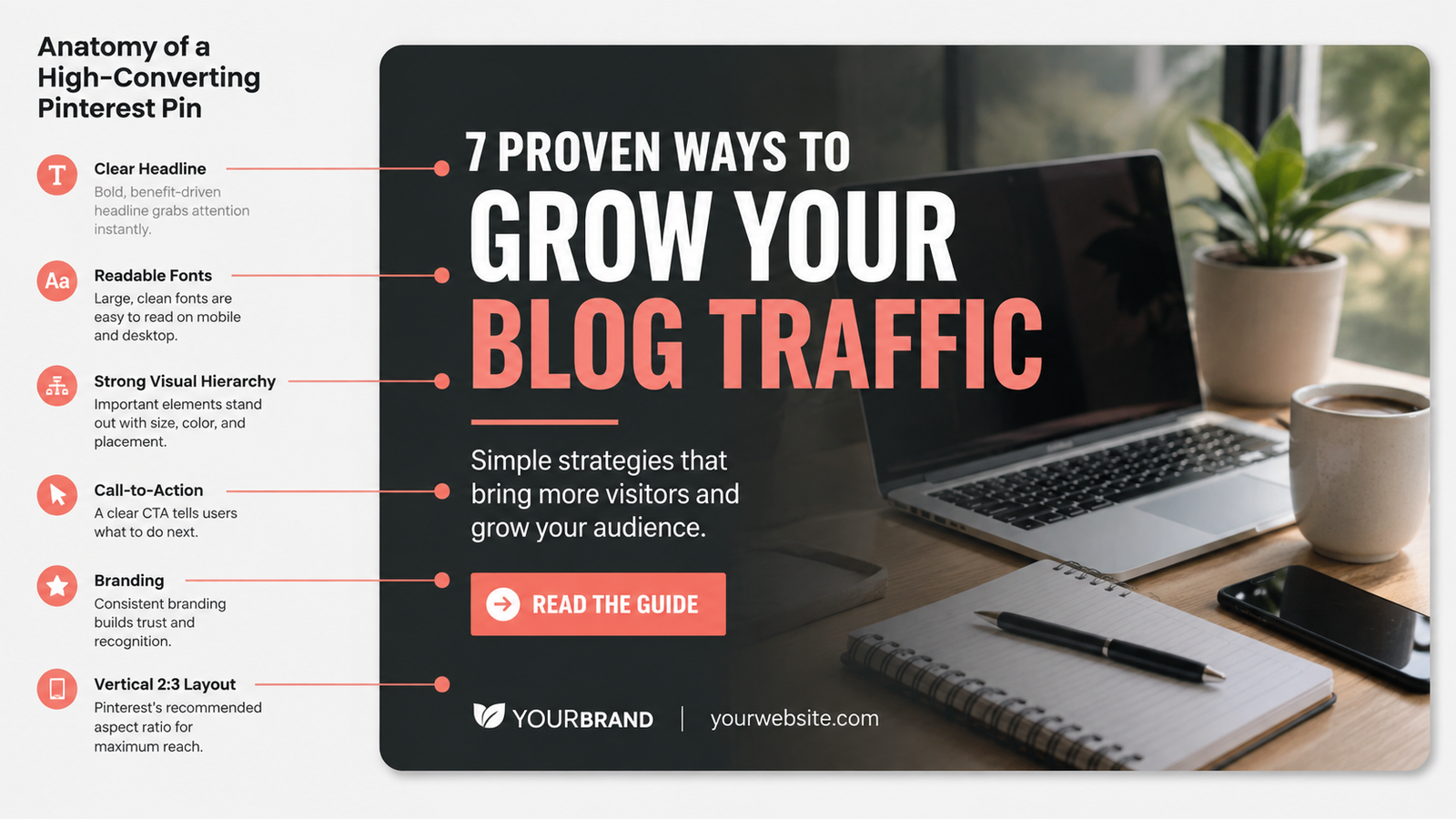
Your Pin is often the first impression someone has of your content. Even if you've written an outstanding article, people won't click if the image fails to grab their attention. The best Pinterest images communicate the value of your article within seconds using clear text, attractive visuals, and a clean layout.
Think of every Pin as a small advertisement for your blog post. Its purpose isn't to explain everything—it should create enough curiosity that users want to click and read the full article on your website.
Elements Every Pinterest Pin Should Include
| Element | Best Practice |
|---|---|
| Image Size | Use a vertical design with a 2:3 aspect ratio (for example, 1000 × 1500 pixels). |
| Headline | Write a clear benefit-focused title that's easy to read on mobile devices. |
| Brand Identity | Use consistent colors, fonts, and your website logo to build recognition. |
| Readable Fonts | Choose large, simple fonts that remain readable on smartphones. |
| Website URL | Add your domain name subtly to improve brand recognition and discourage unauthorized sharing. |
Keep Your Images Optimized
High-quality visuals are important, but oversized image files can slow down your website. A slow-loading blog often leads to higher bounce rates, especially for visitors arriving from Pinterest on mobile devices. Compressing images without noticeably reducing quality helps pages load faster while providing a better experience for readers.
Helpful Image Optimization Tools
Before uploading images to your blog, consider optimizing them to improve page speed and reduce file size.
- • Image Compressor — Reduce file size while maintaining visual quality.
- • Image Resizer — Resize images to Pinterest's recommended dimensions.
- • WebP Converter — Convert images to modern formats for faster loading websites.
- • JPG to PNG Converter — Switch formats when transparency or higher-quality graphics are needed.
Step 5: Use AI Videos to Reach More People
While traditional image Pins continue to perform well, short videos are becoming an increasingly effective way to capture attention on Pinterest. Motion naturally stands out as users scroll through their feed, making video Pins an excellent complement to your existing content strategy. Instead of replacing image Pins, AI-generated videos should be used to expand your reach and encourage more people to visit your blog.
The biggest advantage of AI video tools is speed. Instead of recording yourself, hiring a video editor, or learning complex software, you can use artificial intelligence to generate short educational videos from your existing blog posts. This allows you to create multiple pieces of content from a single article, helping you reach different audiences while saving time.
Turn One Blog Post into Multiple Videos
Every high-quality blog post contains several ideas that can be transformed into individual short videos. Rather than summarizing the entire article, focus on one useful tip or answer one common question. A single guide can often produce multiple videos, each targeting a different search intent. This approach increases your content output without requiring you to write new articles every day.
Solve Problems Instead of Promoting Products
The most successful Pinterest videos teach something valuable before asking viewers to visit a website. Instead of creating advertisements, create educational content that solves a small part of a larger problem. For example, a cleaning blog could demonstrate one quick stain removal tip, while a hair care blog could explain one habit that may reduce gray hair. The complete guide, additional methods, or detailed comparison can then be available on your blog, giving viewers a genuine reason to click through.
AI Makes Content Creation More Consistent
Modern AI tools can assist with brainstorming ideas, writing video scripts, generating visuals, creating voiceovers, adding captions, and producing short promotional clips. This allows bloggers to publish content more consistently without spending hours editing every video manually. AI should be viewed as a productivity assistant that speeds up content creation while allowing you to focus on producing accurate and genuinely helpful information.
Match Videos to Commercial Search Intent
Some topics naturally lead readers toward products or services because they're already researching solutions. Subjects such as home cleaning, skincare, gardening, cooking, fitness, productivity, business software, digital marketing, and home improvement often have commercial intent. Educational videos in these niches can introduce the problem, demonstrate a useful tip, and then invite viewers to read the complete guide where they can explore recommended products, detailed tutorials, downloadable resources, or comparison articles.
Use Videos to Build Trust, Not Clickbait
Avoid creating videos that exaggerate results or hide important information simply to generate clicks. Instead, provide genuine value within the video itself while making it clear that the full explanation, additional examples, printable checklist, or complete tutorial is available on your website. This approach builds trust with your audience and attracts visitors who are genuinely interested in learning more.
Create a Content Ecosystem
Think of your blog as the central hub for your content. Every article can become multiple Pinterest image Pins, several short AI-generated videos, infographics, checklists, and social media posts that all point back to the same helpful resource. Instead of creating new ideas for every platform, repurpose one well-written article into different formats so each piece of content works together to grow your audience and increase long-term traffic.
Real Examples of AI Video Content That Promotes Your Blog Naturally
The goal of every AI-generated video isn't to explain your entire blog post—it's to solve one small problem and encourage viewers to learn more. Think of your video as a preview that demonstrates your expertise while directing interested users to the complete guide on your website. Below are several examples of how different blog topics can become engaging Pinterest videos.
| Blog Article | AI Video Idea | Natural Call-to-Action |
|---|---|---|
| How to Clean White Shoes at Home | Demonstrate one quick cleaning technique with before-and-after visuals. | Read the complete guide for five more cleaning methods and product recommendations. |
| Natural Gray Hair Solutions | Explain one everyday habit that may help maintain healthier hair. | Visit the blog to compare natural remedies, treatments, and expert tips. |
| Beginner's SEO Checklist | Share three quick SEO improvements every website should make. | Download the complete SEO checklist and optimize every page. |
| Small Kitchen Storage Ideas | Show three clever storage hacks using simple animations. | Explore 25 additional space-saving ideas on the blog. |
| Best Budget Travel Tips | Highlight three simple ways to reduce travel expenses. | Read the full travel planning guide and free budget checklist. |
| Pinterest Blogging Guide | Explain one Pinterest SEO tip in under 30 seconds. | Read the complete beginner's guide with step-by-step strategies. |
This approach works because viewers receive immediate value without feeling like they're watching an advertisement. Instead of asking people to "visit my website," you first help them solve a small problem. Those who want deeper explanations, downloadable resources, comparisons, or additional examples are naturally motivated to continue reading your blog, where you can introduce your products, affiliate recommendations, or services in a much more helpful and trustworthy way.
Step 6: Publish and Optimize Your Pins
Creating a beautiful Pin is only half the job. The way you publish and optimize your Pins determines whether Pinterest understands your content and shows it to the right audience. Every title, description, board, and keyword helps Pinterest connect your content with people actively searching for it. Taking a few extra minutes to optimize each Pin can significantly improve its long-term performance.
Think of publishing as more than simply uploading an image. Every Pin should be optimized to answer a user's search, encourage clicks, and lead visitors to a valuable page on your website. Consistency and continual improvement often produce better results than publishing dozens of unoptimized Pins.
Optimize Every Part of Your Pin
| Optimization Area | Best Practice |
|---|---|
| Pin Title | Include your primary keyword naturally while making the title clear, helpful, and interesting enough to encourage clicks. |
| Pin Description | Explain what readers will learn, naturally include related keywords, and encourage them to visit your article for the complete guide. |
| Destination URL | Always link directly to the most relevant blog post instead of your homepage. Users should immediately find the information promised by the Pin. |
| Pinterest Board | Save each Pin to a board that closely matches its topic. Well-organized boards help Pinterest better understand your content. |
| Keywords | Use relevant keywords naturally in your title, description, and board names without overusing them. |
Create Multiple Pins for Every Blog Post
Publishing only one Pin for a blog post limits its potential reach. Instead, create several Pins with different headlines, colors, layouts, and images while linking them to the same article. Different users respond to different designs, and multiple Pins increase the opportunities for your content to appear in Pinterest search results.
Let AI Help You Work Faster
AI writing assistants such as ChatGPT, Gemini, Claude, Microsoft Copilot, and similar tools can help you brainstorm keyword ideas, generate multiple Pin titles, improve descriptions, rewrite headlines, and discover fresh content angles. They won't replace quality content, but they can significantly reduce the time required to prepare optimized Pins for every article.
| AI Can Help With | Example |
|---|---|
| Pin Titles | Generate 10 headline variations targeting different search intent. |
| Descriptions | Write keyword-rich descriptions that encourage clicks. |
| Keywords | Discover related long-tail search phrases. |
| Pin Ideas | Suggest seasonal topics, alternative headlines, and new content ideas. |
Publish Consistently Instead of Chasing Virality
Pinterest rewards creators who regularly publish helpful content. Rather than uploading dozens of Pins in one day and disappearing for weeks, establish a realistic publishing schedule that you can maintain consistently. A steady flow of new Pins gives Pinterest more opportunities to understand your content and recommend it to users over time.
Monitor Performance and Keep Improving
Your first Pin won't always be your best-performing Pin. Regularly review your Pinterest Analytics to identify which Pins receive the most impressions, saves, outbound clicks, and engagement. Successful Pins can inspire new designs, while underperforming Pins may benefit from updated titles, improved descriptions, fresh images, or stronger headlines.
Treat Pinterest as an ongoing marketing system rather than a one-time task. Publish consistently, measure what works, improve what doesn't, and continue creating helpful content that solves real problems. Small improvements made over time often produce significantly better long-term traffic than constantly chasing viral trends.
Pinterest SEO Tips That Actually Work
Success on Pinterest begins with understanding what people are actually searching for. Every Pin should align with a specific search intent rather than relying on generic or overly broad topics. Relevant keywords naturally placed in your Pin title, description, board name, and blog article help Pinterest understand your content and recommend it to the right audience. Publishing Pins that genuinely answer common questions builds trust with both users and the platform, increasing the likelihood that your content will continue appearing in search results long after it's published. Organizing Pins into focused boards, creating multiple unique Pins for the same article, and maintaining consistent branding also strengthen your overall Pinterest presence and improve discoverability.
Optimization doesn't stop after clicking the publish button. High-performing Pinterest creators regularly monitor impressions, saves, outbound clicks, and engagement to understand which content resonates most with their audience. Updating headlines, refreshing Pin designs, testing different keyword combinations, and improving click-through rates can often revive older content and generate new traffic without writing another blog post. Rather than chasing viral trends, focus on publishing valuable evergreen content, improving existing Pins over time, and building a well-organized library of articles that consistently solve real problems. A long-term Pinterest SEO strategy built around quality, relevance, and continuous improvement is far more sustainable than relying on short-term growth tactics.
Common Pinterest Blogging Mistakes
Pinterest can become a powerful source of long-term organic traffic, but many bloggers unknowingly make mistakes that limit their growth. Most of these issues are easy to fix once you understand how Pinterest evaluates content. Avoiding the following mistakes will improve your visibility, increase click-through rates, and help build a stronger Pinterest strategy over time.
Publishing Low-Quality Pins
Blurry images, cluttered layouts, poor color contrast, or unreadable text reduce the chances of users clicking your Pin. A clean design with a clear headline and professional branding creates a stronger first impression and encourages more engagement.
Ignoring Keywords
Pinterest relies heavily on keywords to understand your content. Skipping keyword research or using vague titles makes it difficult for the platform to match your Pins with relevant searches, reducing your potential reach.
Inconsistent Branding
Using different fonts, colors, or visual styles on every Pin makes your content difficult to recognize. Consistent branding builds trust and helps users instantly identify your Pins as they browse Pinterest.
Writing Weak or Misleading Titles
Generic headlines rarely attract attention. Titles should clearly communicate the value of the article while accurately describing what readers will find after clicking. Avoid exaggerated promises or misleading clickbait.
Publishing Weak Blog Content
Even the best Pin cannot compensate for a poor article. If visitors arrive on your website and don't find useful, trustworthy, or well-structured information, they'll quickly leave without exploring more of your content.
Creating Only One Pin Per Article
Every article can be promoted using multiple Pin designs, headlines, and formats. Creating only one Pin reduces your chances of reaching different audiences and limits the long-term visibility of your content.
Publishing Inconsistently
Long gaps between publishing new Pins make it harder to build momentum. A realistic, consistent publishing schedule is far more effective than uploading dozens of Pins in a single day and then remaining inactive.
Expecting Overnight Traffic
Pinterest is a long-term traffic platform rather than an instant growth strategy. Many successful Pins take weeks or even months to gain traction. Focus on publishing helpful content, improving your existing Pins, and staying consistent instead of expecting immediate results.
How Long Does It Take to Get Traffic?
One of the most common questions new bloggers ask is how quickly Pinterest starts sending visitors. The honest answer is that there isn't a fixed timeline. Results depend on factors such as your niche, content quality, keyword optimization, publishing consistency, and how helpful your articles are. While some Pins gain visibility within a few days, many continue growing gradually over several months as Pinterest gathers more engagement data and understands who the content is most relevant to.
The First Month
During the first few weeks, your main goal should be building a strong foundation rather than expecting significant traffic. Focus on publishing high-quality blog posts, creating multiple optimized Pins for each article, organizing your boards, and maintaining a consistent publishing schedule. Even if traffic is minimal at this stage, every new article and Pin increases your future growth potential.
Three to Six Months
As your content library grows, Pinterest has more opportunities to recommend your Pins in search results and related feeds. This is often the period when bloggers begin noticing more consistent impressions, saves, outbound clicks, and returning visitors. Continuing to publish helpful content and improving existing Pins usually produces better long-term results than constantly chasing new trends.
One Year and Beyond
Bloggers who consistently publish evergreen articles, optimize their Pins, and regularly update existing content often build a valuable library that continues generating traffic over time. Instead of relying on a few viral Pins, they benefit from hundreds of articles and Pins working together to attract readers from different search queries. This gradual growth creates a more stable and sustainable traffic source than depending on short-term trends.
Ways to Monetize from Pinterest Traffic
Pinterest traffic becomes valuable when it leads visitors to content that solves problems and builds trust. Rather than trying to monetize every click immediately, focus on creating a website that consistently helps people achieve a goal. Once readers trust your content, monetization becomes a natural next step instead of feeling like a sales pitch. The best-performing blogs often generate income through multiple revenue streams rather than depending on a single source.
Think of Pinterest as the beginning of your customer's journey. A user discovers your Pin, visits your article, learns something valuable, explores more pages, joins your email list, and eventually purchases a product or service when they are ready. Building this long-term relationship usually creates more sustainable income than chasing quick conversions.
Display Advertising
Once your website receives consistent traffic, display advertising can become a passive income source. Every visitor who reads your articles increases the opportunity for ad revenue, making evergreen Pinterest traffic especially valuable because older articles can continue generating income long after publication.
Affiliate Marketing
Instead of recommending random products, create honest comparison articles, buying guides, tutorials, and product reviews that genuinely help readers make informed decisions. Visitors who trust your recommendations are far more likely to purchase through your affiliate links than those who feel they are being sold to.
Digital Products
Pinterest is an excellent platform for promoting digital products because many users actively search for templates, planners, printable resources, design assets, business documents, spreadsheets, checklists, and educational downloads. If your blog already teaches a topic, creating premium resources is a natural extension of the content readers already find valuable.
Online Courses
Long-form tutorials often reveal opportunities to teach a subject in greater depth. If your articles consistently solve beginner problems, an online course can provide structured lessons, practical demonstrations, worksheets, and guided learning for readers who want a more complete educational experience.
Services and Consulting
Many businesses use Pinterest to discover experts before hiring them. If you provide consulting, freelance work, coaching, web design, SEO, marketing, photography, or similar services, your blog can demonstrate your expertise while Pinterest introduces new potential clients who are already interested in your field.
Build an Email List
Not every visitor is ready to purchase immediately, but many are willing to subscribe if they receive something valuable in return. Offering a free checklist, planner, template, guide, or resource helps you build an email list that allows you to continue helping readers long after they leave your website.
Promote SaaS Products and Online Tools
Educational blog posts naturally create opportunities to recommend helpful online tools. For example, an article about SEO can introduce an on-page SEO checker, while a guide about image optimization can recommend an image compressor or image resizer. When tools genuinely solve the reader's problem, they become a valuable part of the learning experience rather than an interruption. Whether the tools are free, subscription-based, or premium, they can become a long-term revenue source while continuing to provide practical value.
Memberships and Premium Communities
As your audience grows, some readers will want more than free articles. A membership can provide exclusive tutorials, live workshops, downloadable resources, private communities, or early access to new content. This creates recurring revenue while strengthening relationships with your most engaged followers.
Templates, Checklists, and Downloadable Resources
One of the simplest ways to monetize a blog is by turning your knowledge into practical resources. Business templates, budgeting spreadsheets, project planners, marketing checklists, resume templates, content calendars, design assets, and printable worksheets save readers time and complement the educational content already available on your blog.
Build a Complete Business, Not Just a Blog
The most successful Pinterest creators rarely depend on a single income stream. Instead, they build an ecosystem where every piece of content supports another. A helpful blog post attracts visitors, Pinterest introduces new readers, an email list builds long-term relationships, digital products provide additional value, online tools solve practical problems, and premium services help those who need personalized support. Each part strengthens the others, creating a business that continues growing as more evergreen content is published.
Pinterest Pin
        ↓
Helpful Blog Post
        ↓
Reader Trust
        ↓
Email Subscriber
        ↓
Free Tools & Resources
        ↓
Templates / Products / Courses
        ↓
Long-Term Customer
Best Types of Blog Posts for Pinterest
Not every blog post performs equally well on Pinterest. Users typically visit the platform because they're looking for inspiration, practical solutions, or step-by-step guidance that helps them accomplish a specific goal. Articles that provide immediate value, solve common problems, or simplify complex topics tend to receive more saves, clicks, and long-term engagement. Choosing the right content format increases the likelihood that your Pins will continue attracting visitors long after they're published.
If you're unsure what to write next, focus on creating evergreen articles that remain useful throughout the year. The content types below consistently perform well across many different niches because they match the way Pinterest users search for information and make decisions.
| Blog Post Type | Why It Performs Well on Pinterest |
|---|---|
| Step-by-Step Tutorials | Readers want clear instructions that help them complete a task from start to finish. |
| Beginner Guides | Comprehensive guides answer common questions and continue attracting new readers over time. |
| Checklists | Easy-to-follow checklists simplify complicated processes and are frequently saved for future reference. |
| Templates | Ready-to-use templates save readers time and encourage repeat visits to your website. |
| Resource Lists | Curated collections of tools, websites, or recommendations provide lasting value for readers. |
| Printables | Printable planners, worksheets, calendars, and trackers are highly shareable and often generate repeat traffic. |
| Comparison Articles | Readers comparing products, services, or software are often ready to make purchasing decisions. |
| Common Mistakes | Articles that help readers avoid costly mistakes naturally attract clicks and shares. |
| Before & After Guides | Visual transformations encourage curiosity and work particularly well for Pinterest's image-focused audience. |
| How-To Articles | Practical problem-solving content remains relevant for years and consistently attracts organic traffic. |
Rather than publishing random articles, build a library of evergreen resources that continue helping readers long after they're published. Every helpful article becomes another opportunity to create multiple Pins, AI-generated videos, downloadable resources, and future updates. Over time, this growing collection of high-quality content becomes one of your most valuable assets for attracting consistent Pinterest traffic and building a sustainable online business.
Final Thoughts
Pinterest isn't a shortcut to overnight success, but it is one of the few platforms where a single piece of high-quality content can continue attracting visitors for months or even years. Every helpful article you publish becomes a long-term asset that can be promoted through multiple Pins, AI-generated videos, and evergreen search traffic. Instead of chasing viral trends, focus on building a growing library of valuable content that answers real questions and solves real problems. As your content library expands, so does your potential to attract consistent visitors without relying entirely on search engines or paid advertising.
The bloggers who achieve the best long-term results rarely publish random articles or create Pins without a strategy. They choose a clear niche, understand their audience, create genuinely useful content, optimize every Pin for search, monitor performance, and continuously improve what they've already published. Small improvements made consistently over time usually produce better results than trying to find the next viral hack or algorithm trick.
Remember that Pinterest's primary goal is to connect users with the most helpful content available. If your articles educate readers, your Pins accurately represent what's on your website, and your content delivers on its promise, you'll naturally build trust with both your audience and the platform. That trust often leads to higher engagement, repeat visitors, email subscribers, loyal readers, and eventually customers who value your work.
Don't wait until everything feels perfect before getting started. Publish your first article, create several well-designed Pins, experiment with different headlines, test new ideas, and learn from your analytics. Every successful Pinterest strategy evolves through continuous testing and improvement. The sooner you begin, the sooner you'll start collecting valuable data that helps you create better content and reach more readers.
Treat every blog post as an investment rather than a one-time publication. One article can become multiple Pins, short AI videos, downloadable resources, email newsletters, and social media content that all lead readers back to your website. Over time, this content ecosystem works together to build authority, grow your audience, and create multiple opportunities to generate income. Stay consistent, continue learning, and focus on helping people first—the traffic and business growth are much more likely to follow.