
What Is HTML?
HTML (HyperText Markup Language) is the standard markup language used to create and structure web pages. It tells web browsers how content should be organized by using elements such as headings, paragraphs, images, links, tables, forms, and lists. Every website on the internet relies on HTML as its foundation, making it one of the most important technologies for web development.
HTML focuses on the structure and meaning of content rather than its appearance. Modern websites combine HTML with CSS for styling and JavaScript for interactivity, allowing developers to build responsive, accessible, and feature-rich web experiences across desktops, tablets, and mobile devices.
What Does HTML Stand For?
HTML stands for HyperText Markup Language. The term HyperText refers to text that contains hyperlinks connecting one webpage to another, while Markup Language means HTML uses tags to describe the structure and purpose of content. Browsers read these tags and display the webpage accordingly.
Unlike programming languages, HTML does not perform calculations or execute logic. Instead, it provides the building blocks that define how content is organized, making it easier for browsers, search engines, and assistive technologies to understand a webpage.
How HTML Works
HTML works by organizing webpage content using elements known as tags. These tags define different types of content, such as headings, paragraphs, buttons, images, links, and forms. When an HTML file is opened, the browser reads these elements from top to bottom and renders the webpage based on their structure.
HTML is commonly used alongside CSS and JavaScript. CSS controls the visual design, including colors, fonts, and layouts, while JavaScript adds interactive features like animations, sliders, form validation, and dynamic content updates.
Common Uses of HTML
HTML is used to build nearly every type of website, including business websites, blogs, eCommerce stores, landing pages, portfolios, educational platforms, dashboards, and web applications. It structures text, images, videos, navigation menus, forms, and other content so users can interact with websites effectively.
Beyond traditional websites, HTML is also used in email templates, online documentation, progressive web apps (PWAs), and many content management systems. Learning HTML provides the foundation for modern web development and makes it easier to understand technologies such as CSS, JavaScript, and HTML5.
What Is HTML5?
HTML5 is the latest major version of HyperText Markup Language and the current standard used for building modern websites and web applications. It introduces new semantic elements, built-in support for audio and video, improved forms, graphics capabilities, offline storage, and powerful APIs that allow developers to create faster, more interactive, and mobile-friendly experiences without relying heavily on third-party plugins.
Today, HTML5 is supported by all major web browsers and is widely used for responsive websites, web applications, online games, streaming platforms, and progressive web apps (PWAs). Its modern features make it the preferred choice for developers building websites that are accessible, SEO-friendly, and compatible across different devices.
Why HTML5 Was Introduced
Earlier versions of HTML were designed primarily for displaying documents and simple web pages. As websites became more interactive, developers had to depend on external technologies like Adobe Flash, Java applets, and numerous plugins to play videos, create animations, store data, or build advanced web applications. These solutions often caused security issues, performance problems, and poor compatibility across devices.
HTML5 was introduced to solve these limitations by adding native support for multimedia, graphics, semantic elements, local storage, and browser APIs. This allowed developers to build rich, interactive websites using open web standards while improving speed, security, accessibility, search engine optimization, and mobile compatibility.
Key Features of HTML5
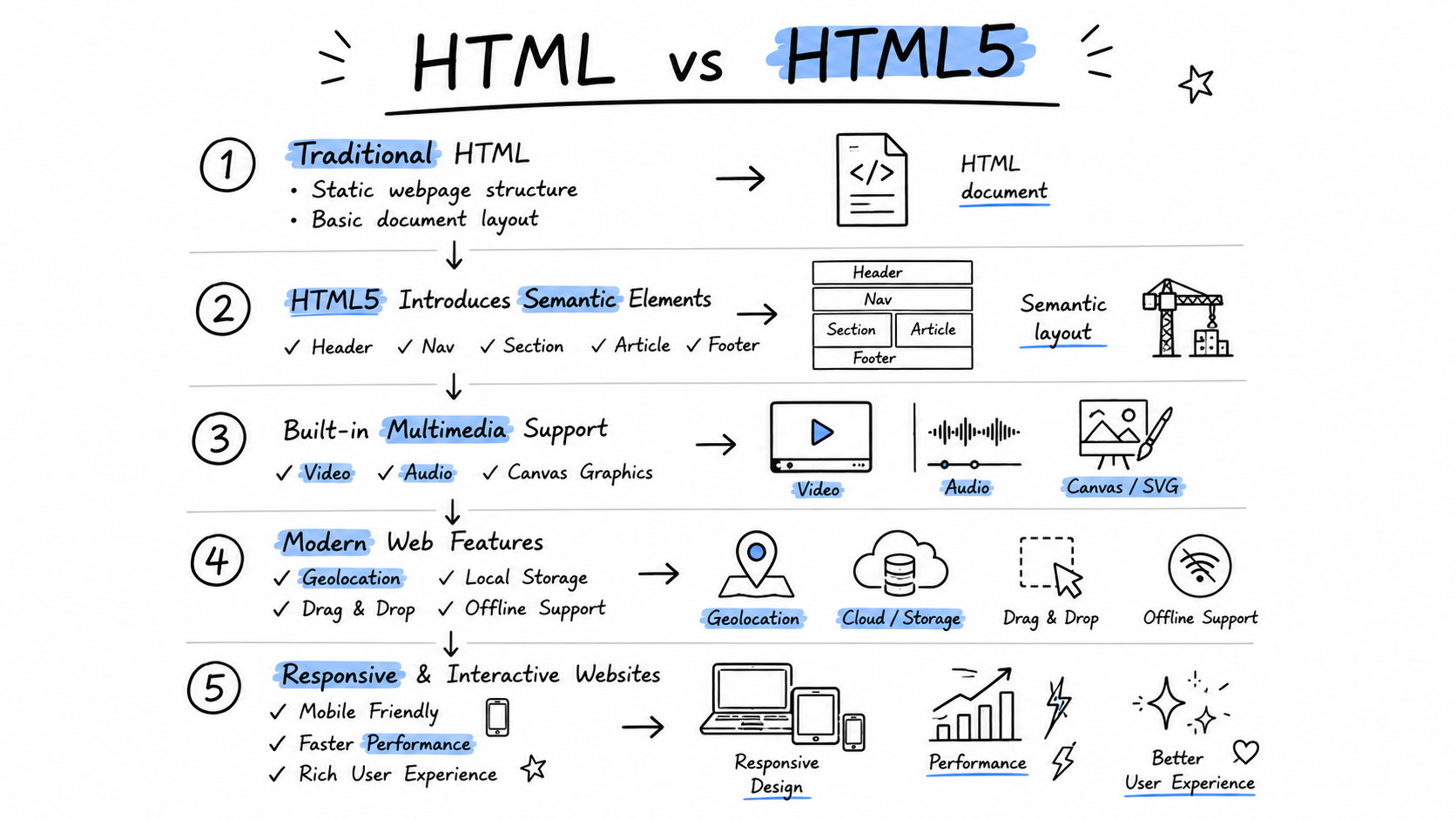
HTML5 introduced many features that transformed modern web development. It includes semantic elements such as <header>, <main>, <section>, and <footer> for better page structure and SEO. It also provides native support for audio and video, eliminating the need for external plugins to display multimedia content.
Other important HTML5 features include the Canvas element for graphics, SVG support, responsive form controls, drag-and-drop functionality, local storage, geolocation, offline web applications, and powerful browser APIs. Together, these features make HTML5 faster, more flexible, and better suited for creating modern websites and web applications than previous HTML versions.
HTML vs HTML5: Quick Comparison
HTML and HTML5 share the same core purpose of structuring web pages, but HTML5 introduces many modern features that make web development faster, more powerful, and more efficient. The comparison below highlights the key differences between HTML and HTML5, helping you understand why HTML5 has become the standard for modern websites and web applications.
| Feature | HTML | HTML5 |
|---|---|---|
| Release | Earlier versions of HTML | Latest HTML standard |
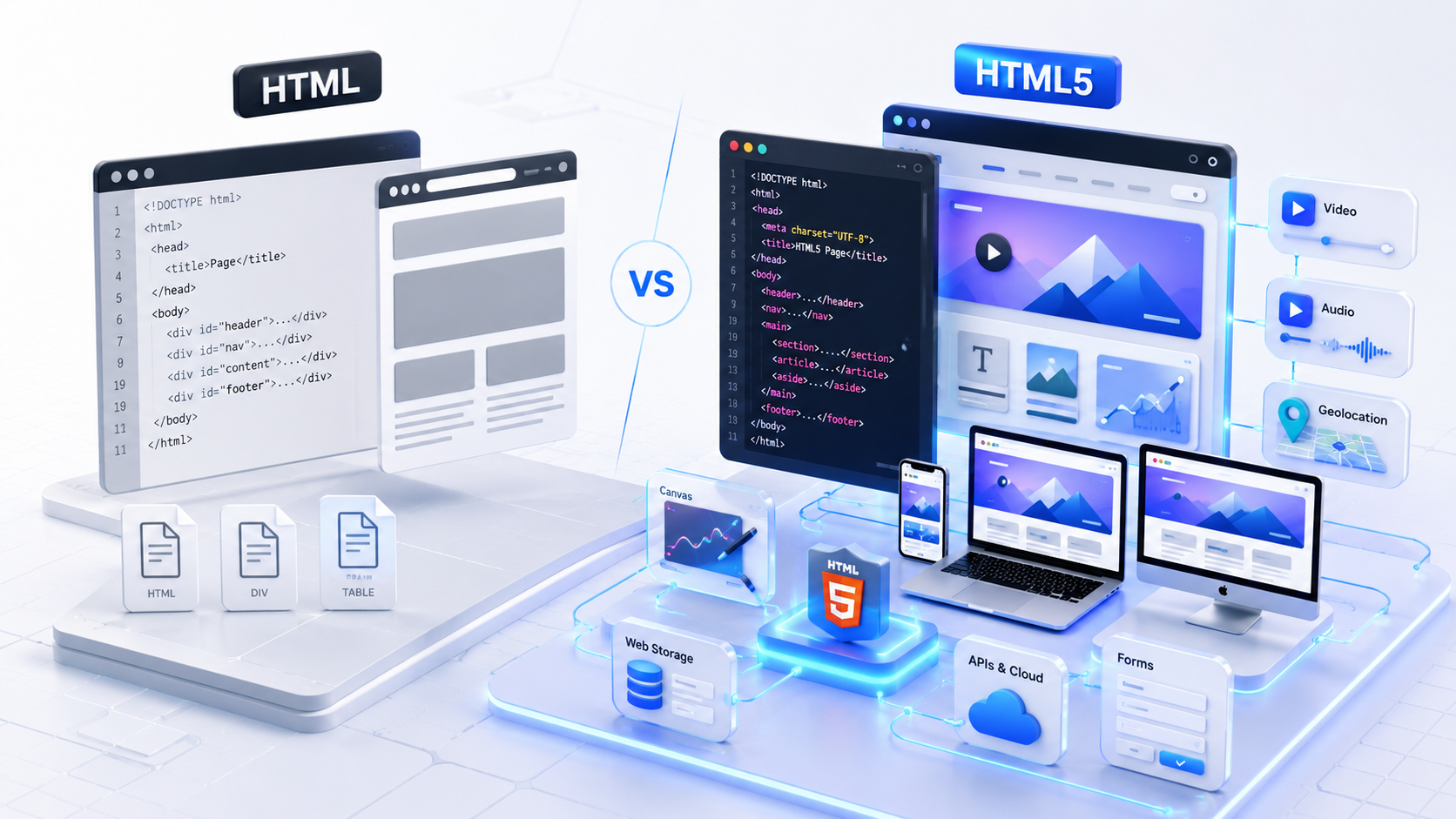
| DOCTYPE | Long and complex declaration | Simple <!DOCTYPE html> |
| Semantic Elements | Limited support | Native semantic elements like header, main, article, and footer |
| Audio & Video | Requires external plugins | Built-in audio and video support |
| Graphics | Limited graphics support | Canvas and SVG support |
| Forms | Basic form controls | Advanced input types and validation |
| Storage | Cookies only | Local Storage and Session Storage |
| APIs | Very limited | Geolocation, Drag & Drop, Web Workers, WebSocket, and more |
| Mobile Support | Limited optimization | Designed for responsive and mobile-first websites |
| Best For | Basic web pages and legacy websites | Modern websites, web apps, and progressive web apps (PWAs) |
Major Differences Between HTML and HTML5
While HTML and HTML5 both define the structure of web pages, HTML5 introduces several improvements that make websites more powerful, accessible, and easier to develop. From simplified syntax and semantic elements to multimedia support and browser APIs, HTML5 removes many limitations found in earlier versions of HTML. Below are the most important differences every beginner and web developer should know.
DOCTYPE Declaration
Older versions of HTML required lengthy and version-specific DOCTYPE declarations that were difficult to remember. HTML5 simplifies this by using a single declaration: <!DOCTYPE html>. This shorter syntax is easier to write, improves readability, and ensures browsers render webpages using modern standards.
The simplified DOCTYPE also reduces compatibility issues and has become the standard declaration used in virtually every modern website.
Semantic Elements
Earlier HTML versions relied heavily on generic elements such as <div> to organize webpages. HTML5 introduced semantic elements like <header>, <nav>, <main>, <section>, <article>, and <footer>, making page structures easier for developers, browsers, and search engines to understand.
Semantic HTML improves accessibility, enhances SEO, and creates cleaner, more maintainable code compared to using generic containers everywhere.
Audio and Video Support
One of HTML5's biggest improvements is native support for multimedia. Earlier HTML versions required external plugins such as Adobe Flash to play audio and video files.
HTML5 introduced the <audio> and <video> elements, allowing multimedia content to play directly inside the browser without additional software, resulting in faster, safer, and more reliable websites.
Canvas and SVG Graphics
Traditional HTML offered very limited support for graphics. HTML5 introduced the <canvas> element for drawing graphics dynamically using JavaScript and improved support for SVG (Scalable Vector Graphics).
These technologies make it possible to build charts, games, animations, icons, diagrams, and interactive visualizations without relying on third-party plugins.
Form Enhancements
HTML5 greatly improves web forms by introducing new input types such as email, number, date, color, range, and URL. These input types help browsers validate user input automatically.
Built-in validation reduces the amount of JavaScript developers need to write while providing a better user experience across desktop and mobile devices.
Local Storage
Earlier websites mainly relied on cookies to store small amounts of data. HTML5 introduced Local Storage and Session Storage, allowing websites to save significantly more data directly in the user's browser.
This feature enables faster applications, user preferences, shopping carts, offline data, and improved website performance without constantly communicating with the server.
Geolocation API
HTML5 includes the Geolocation API, allowing websites to access a user's approximate location after receiving permission. Developers can build location-aware applications without requiring external plugins.
Common uses include maps, nearby business searches, delivery services, weather applications, ride-sharing platforms, and location-based recommendations.
Offline Web Applications
HTML5 introduced technologies that allow certain web applications to continue working even when an internet connection is unavailable. Modern Progressive Web Apps (PWAs) build upon these capabilities using browser storage and service workers.
Offline support improves reliability, reduces loading times, and creates an app-like experience for users on both desktop and mobile devices.
Browser Compatibility
Modern browsers such as Chrome, Firefox, Edge, Safari, and Opera fully support HTML5 and its core features. This widespread compatibility allows developers to build consistent experiences across multiple platforms.
While some legacy browsers have limited support for newer HTML5 features, HTML5 remains the recommended standard for all modern websites due to its performance, accessibility, security, and long-term compatibility.
New Semantic Elements in HTML5
HTML5 introduced several semantic elements that make web pages more meaningful and easier to understand. Unlike generic <div> elements, semantic tags clearly describe the purpose of different sections of a webpage. This improves code readability, accessibility, search engine optimization (SEO), and helps browsers and assistive technologies interpret content more accurately.
<header>
Defines the introductory section of a webpage or a specific section. It commonly contains the website logo, title, navigation links, or search bar.
<nav>
Represents a group of navigation links that help users move between pages or important sections of a website.
<main>
Contains the primary content of a webpage. Each page should generally include only one <main> element.
<section>
Groups related content into logical sections, making long pages easier to organize and understand.
<article>
Represents independent, self-contained content such as blog posts, news articles, tutorials, or forum discussions.
<aside>
Contains supplementary information related to the main content, such as sidebars, advertisements, author information, or related links.
<footer>
Defines the footer section of a webpage or article, typically containing copyright information, contact details, and important links.
<figure>
Groups visual content such as images, diagrams, illustrations, charts, or code examples together with optional captions.
<figcaption>
Provides a descriptive caption for content placed inside a <figure> element, improving context and accessibility.
New HTML5 APIs
HTML5 introduced several powerful Application Programming Interfaces (APIs) that allow developers to build faster, more interactive, and feature-rich web applications. These APIs provide built-in browser capabilities such as location access, offline storage, real-time communication, background processing, and drag-and-drop functionality without relying on external plugins. As a result, modern websites can deliver an experience that feels much closer to native desktop and mobile applications.
Geolocation API
The Geolocation API enables websites to access a user's approximate geographic location after receiving permission. Developers can use this information to provide personalized experiences such as nearby business listings, maps, weather forecasts, ride-sharing services, delivery tracking, and location-based recommendations.
Because user privacy is important, browsers always ask for permission before sharing location data with a website.
Drag and Drop API
The Drag and Drop API allows users to drag elements and drop them into different locations within a webpage. This creates a more intuitive and interactive user experience without requiring complex JavaScript libraries.
It is commonly used for file uploads, task management boards, image galleries, shopping carts, and dashboard applications where users rearrange content visually.
Web Storage API
The Web Storage API introduces Local Storage and Session Storage, allowing websites to store data directly in the user's browser. Compared to traditional cookies, Web Storage offers greater storage capacity and better performance.
Developers use this API to save user preferences, shopping carts, login sessions, application settings, and temporary data, resulting in faster and more responsive web applications.
Web Workers
Web Workers allow JavaScript to run background tasks separately from the main browser thread. This prevents intensive operations from freezing the user interface and keeps websites responsive while performing complex calculations or processing large amounts of data.
They are commonly used for data processing, image editing, large file handling, background synchronization, and other resource-intensive operations.
WebSocket API
The WebSocket API enables real-time, two-way communication between a web browser and a server through a single persistent connection. Unlike traditional HTTP requests, WebSockets allow data to be sent and received instantly without repeatedly refreshing the page.
This API powers live chat applications, multiplayer games, stock market dashboards, online collaboration tools, sports score updates, and other real-time web applications that require instant communication.
Advantages of HTML5
HTML5 offers numerous advantages over previous versions of HTML, making it the preferred standard for modern web development. Its built-in support for multimedia, semantic elements, browser APIs, and responsive design enables developers to create faster, more accessible, and feature-rich websites while reducing dependence on external plugins and third-party technologies.
Better SEO
Semantic elements help search engines understand page content more accurately, improving indexing and search visibility.
Improved Accessibility
Screen readers and assistive technologies can better interpret webpage structure, creating a more inclusive user experience.
Native Audio & Video
Built-in multimedia support eliminates the need for external plugins such as Adobe Flash.
Faster Performance
Modern browser features and optimized APIs help websites load faster and provide smoother interactions.
Mobile-Friendly
HTML5 is designed to work seamlessly across desktops, tablets, and smartphones with responsive layouts.
Powerful Browser APIs
Developers can access features like geolocation, web storage, drag and drop, and WebSockets without additional plugins.
Cleaner & Maintainable Code
Semantic tags create a well-organized codebase that is easier to read, maintain, and scale.
Future-Ready Standard
HTML5 continues to evolve with modern browsers, making it the foundation for today's websites and web applications.
Disadvantages of HTML5
Although HTML5 provides significant improvements over earlier HTML versions, it is not without limitations. Some advanced features depend on browser support, JavaScript, or additional technologies, and developers still need to follow best practices to ensure compatibility, security, and consistent performance across different devices.
Legacy Browser Limitations
Older browsers may not fully support newer HTML5 features without fallbacks or polyfills.
Client-Side Security Risks
Features like local storage should never be used to store sensitive information because browser data can be accessed by malicious scripts.
JavaScript Dependency
Many HTML5 capabilities require JavaScript to function, making it essential for interactive web applications.
Learning Curve
Beginners need to understand semantic elements, modern APIs, accessibility, and responsive development to use HTML5 effectively.
Cross-Browser Testing
Developers should test websites across multiple browsers and devices to ensure consistent functionality and appearance.
Requires CSS & JavaScript
HTML5 defines webpage structure, but modern websites still rely on CSS for styling and JavaScript for advanced functionality.
When Should You Use HTML5?
HTML5 should be used for virtually every new website or web application you build. It is the current web standard, fully supported by modern browsers, and provides the semantic elements, multimedia capabilities, responsive features, and browser APIs needed to create fast, accessible, and SEO-friendly websites. Unless you're maintaining a legacy project that depends on older HTML versions, HTML5 is the recommended choice for modern web development.
Business Websites
Create professional company websites, service pages, and corporate portals with clean semantic markup and responsive layouts.
Blogs & News Websites
Use semantic elements like <article> and <section> to improve SEO, readability, and content organization.
eCommerce Stores
Build online stores with product pages, shopping carts, checkout forms, multimedia content, and responsive user experiences.
Portfolio Websites
Showcase projects, images, videos, testimonials, and contact forms using modern HTML5 features and semantic structure.
Web Applications
Develop dashboards, productivity tools, online editors, and interactive applications using HTML5 APIs such as Web Storage and WebSocket.
Progressive Web Apps (PWAs)
Build installable, mobile-friendly web applications with offline capabilities, fast loading times, and app-like user experiences.
Minify Your HTML Before Publishing
Once you've finished writing your HTML, use our free HTML Minifier to remove unnecessary whitespace and comments. Smaller HTML files load faster, improve website performance, and reduce bandwidth without changing your code.
Summary
HTML5 is the modern standard for building websites and web applications, offering significant improvements over earlier versions of HTML. With features such as semantic elements, native audio and video support, enhanced forms, powerful browser APIs, and better mobile compatibility, HTML5 enables developers to create faster, more accessible, and SEO-friendly websites. Understanding the differences between HTML and HTML5 helps beginners and professionals choose the right technologies for modern web development while following current web standards.
Final Thoughts
If you're learning web development today, HTML5 should be your starting point. It provides everything needed to build responsive, feature-rich websites without relying on outdated plugins or legacy technologies. Combined with CSS for styling and JavaScript for interactivity, HTML5 forms the foundation of virtually every modern website on the internet.
Whether you're creating a personal portfolio, business website, blog, eCommerce store, or advanced web application, mastering HTML5 will make your code cleaner, your websites more accessible, and your projects better optimized for search engines and modern browsers. By following HTML5 best practices and using semantic markup, you'll be well-equipped to build websites that are scalable, maintainable, and ready for the future.