
Introduction: Why Isn't Your Website Ranking on Google?
Publishing a website is an exciting milestone, but many website owners are surprised when weeks or even months pass without seeing meaningful traffic from Google Search. You may have invested time creating content, designing your website, and optimizing pages, yet your competitors continue to appear above you while your pages remain difficult to find. This is one of the most common challenges faced by bloggers, business owners, developers, and digital marketers.
A common misconception is that ranking on Google is simply about adding a few keywords to a page. In reality, Google's search algorithm evaluates hundreds of signals before deciding where a webpage should appear in search results. Content quality, search intent, page speed, mobile usability, website authority, technical SEO, internal linking, user experience, and many other factors all contribute to your rankings. Focusing on only one area while ignoring the others often leads to disappointing results.
The good news is that every ranking problem has a cause. Whether your pages haven't been indexed, you're targeting highly competitive keywords, your website has technical issues, or your content doesn't fully answer what people are searching for, identifying the root cause is the first step toward improving your visibility. SEO isn't about guessing—it's about finding problems, fixing them systematically, and measuring the results over time.
In this guide, you'll learn the most common reasons websites fail to rank on Google, how Google's search system evaluates webpages, practical ways to diagnose SEO issues, and proven strategies you can implement to improve your rankings, increase organic traffic, and build long-term search visibility. Whether you've just launched a new website or are trying to recover from poor rankings, this article will help you understand what needs attention and where to focus your efforts first.

How Google Decides Which Websites to Rank
Before fixing your rankings, it's important to understand how Google Search actually works. Many people believe that publishing a page automatically guarantees a position in search results. In reality, Google follows a multi-step process before your content can appear for any keyword. Your page must first be discovered, then analyzed, stored in Google's index, and finally compared against thousands or even millions of competing pages before a ranking is assigned.
Each stage is essential. If Google cannot crawl your page, it cannot index it. If your page isn't indexed, it cannot rank. Even if it is indexed, Google still evaluates hundreds of quality signals to determine whether your content deserves to appear above competing websites.
What Happens After You Publish a Page?
Publishing a page doesn't instantly place it in Google's search results. Google first needs to discover that the page exists. It may find your page through internal links, backlinks from other websites, your XML sitemap, or by revisiting your website during a scheduled crawl. Depending on your website's authority and crawl frequency, this discovery process can take anywhere from a few minutes to several weeks.
Once Google discovers the page, it begins analyzing its content, structure, metadata, images, links, and technical signals to determine whether the page should be added to its search index.
How Google Crawls Your Website
Crawling is the process where Google's automated bots, commonly called Googlebot, visit webpages and follow links to discover new or updated content. During a crawl, Google downloads your page, reads the HTML, processes important resources such as CSS and JavaScript, and identifies links leading to other pages on your website.
Websites with clear navigation, strong internal linking, XML sitemaps, and fast loading speeds are generally easier for Google to crawl. Broken links, blocked pages, and server errors can prevent Googlebot from accessing important content.
How Google Indexes Content
After crawling a page, Google decides whether it should be stored in its search index. Indexing means Google has analyzed the page and added it to its massive database of searchable content. However, being indexed doesn't guarantee high rankings—it simply means the page is eligible to appear in search results.
Pages containing duplicate content, very little useful information, blocked indexing directives, or significant technical issues may be excluded from Google's index altogether.
How Google Chooses Rankings
Once a page has been indexed, Google compares it with other pages that could answer the same search query. Instead of relying on a single ranking factor, Google's algorithms evaluate numerous signals to determine which page provides the most helpful, trustworthy, and relevant experience for the user.
Some of the most important ranking considerations include content quality, search intent, website authority, page experience, Core Web Vitals, mobile usability, internal linking, backlinks, freshness of content, and overall user satisfaction. No single optimization guarantees top rankings; success comes from improving multiple areas consistently.
Is Your Website Actually Indexed?
One of the most common reasons websites don't appear on Google is surprisingly simple—they haven't been indexed yet. Many website owners spend hours optimizing content, researching keywords, and improving page design without first confirming whether Google has actually added their pages to its search index. If a page isn't indexed, it cannot rank, regardless of how well it's optimized.
Before making changes to your SEO strategy, your first step should always be checking whether Google knows your page exists. Fortunately, this only takes a few minutes and can quickly reveal whether you're dealing with an indexing problem or a ranking problem.
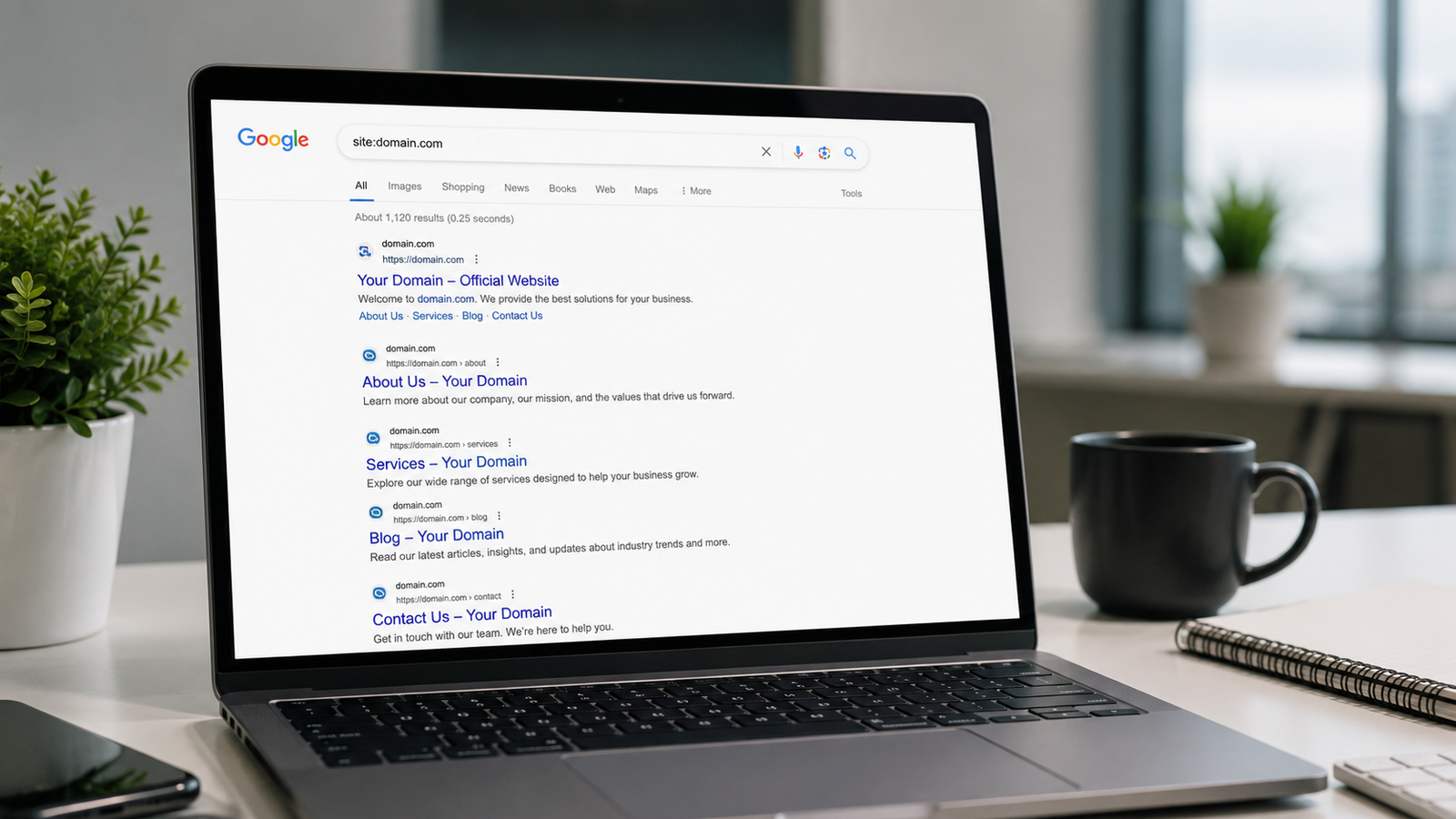
How to Check if Google Indexed Your Website
The fastest way to check whether a page is indexed is by using Google's site: search operator. Open Google Search and type:
site:yourdomain.comReplace yourdomain.com with your own website address. Google will display all indexed pages from your domain. If your page doesn't appear in the results, it may not have been indexed yet.
You can also check a specific page by searching:
site:yourdomain.com/page-urlCommon Reasons Pages Aren't Indexed
If your page isn't indexed, Google is usually telling you that something prevented it from adding the page to its search database. Some problems are technical, while others relate to content quality.
- Your website is brand new and Google hasn't crawled it yet.
- The page is blocked by a noindex tag.
- Your robots.txt file prevents Googlebot from crawling the page.
- The page has very little original or useful content.
- Duplicate pages cause Google to ignore one version.
- The page has no internal links pointing to it.
- Server errors prevented Google from accessing the page.
- Your XML sitemap doesn't include the page.
How to Request Indexing
If you've published a new page or recently fixed SEO issues, you can speed up the discovery process by requesting indexing through Google Search Console. After verifying ownership of your website, paste the page URL into the URL Inspection tool. If Google hasn't indexed the page yet, you'll have the option to request indexing.
Keep in mind that requesting indexing doesn't guarantee immediate rankings. It simply asks Google to revisit the page sooner. Google will still evaluate the page's quality before deciding whether it should appear in search results.
Reason 1: You're Targeting the Wrong Keywords
One of the biggest reasons websites fail to rank on Google has nothing to do with technical SEO or backlinks—it's simply targeting the wrong keywords. Many website owners create excellent content but optimize it for search terms that are either too competitive, don't match what users are actually searching for, or have little search demand. As a result, even high-quality articles struggle to attract organic traffic.
Choosing the right keyword isn't about finding the one with the highest search volume. It's about finding topics your audience genuinely searches for while giving your website a realistic chance of competing. For newer websites especially, targeting highly competitive keywords often leads to months of frustration with little progress.
Targeting Highly Competitive Keywords
New websites often try to rank for broad keywords such as "SEO", "Digital Marketing", or "Web Development". These searches are dominated by large, authoritative websites that have spent years building trust, backlinks, and topical authority. Competing against them immediately is extremely difficult.
Instead, focus on more specific topics where competition is lower and users are searching for detailed answers.
Ignoring Search Intent
Google doesn't rank pages simply because they contain the right keywords. It ranks pages that best satisfy what users are trying to accomplish. This is known as search intent. If someone searches for "how to optimize website speed", they expect practical solutions—not a general explanation of what website speed means.
Before writing an article, ask yourself what problem the user is trying to solve and make sure your content directly answers that question.
Choosing Better Long-Tail Keywords
Long-tail keywords are longer, more specific search queries that usually have lower competition and stronger user intent. Although they often receive fewer searches than broad keywords, they tend to attract visitors who are looking for exactly the information you provide.
For example, instead of targeting "SEO", write articles such as:
- Why Your Website Isn't Ranking on Google and How to Fix It
- Common SEO Mistakes That Prevent Higher Rankings
- How to Build Topical Authority for Better Google Rankings
- How to Optimize Images for SEO Without Losing Quality
- Technical SEO Checklist for Beginners
Publishing multiple high-quality articles around related long-tail keywords helps build topical authority. Over time, this increases your website's credibility and improves your ability to rank for broader, more competitive keywords.
Reason 2: Your Content Doesn't Solve the User's Problem
Ranking on Google isn't just about publishing more articles—it's about publishing content that genuinely helps people. Google's goal is to provide users with the most useful answer for every search query. If your content doesn't answer the user's question, solve their problem, or provide information that's better than competing pages, Google has very little reason to rank it.
Many websites create articles that look complete at first glance but leave readers searching for another page within minutes. When visitors can't find the information they need, they return to Google and click another result. This signals that your content didn't fully satisfy the user's search intent.
Thin Content
Thin content provides very little value to readers. It often contains short explanations, generic advice, or information copied from countless other websites. If someone searches for a solution and your article only scratches the surface, they're unlikely to stay on your page.
Instead of asking yourself, "How many words should this article have?", ask "Have I answered every important question my reader is likely to have?"
Duplicate or Unoriginal Content
Publishing content that's nearly identical to existing articles makes it difficult for Google to understand why your page deserves to rank. Simply rewriting another article or replacing a few words doesn't create additional value for users.
Add your own explanations, examples, comparisons, screenshots, experiences, and practical advice to create content that's genuinely different and more useful.
Outdated Information
Search engines prefer content that remains accurate and relevant. If your article references outdated SEO techniques, discontinued software features, or old industry practices, readers may lose trust in your content.
Review your most important articles regularly. Updating statistics, screenshots, examples, and recommendations helps keep your content useful and signals that your website is actively maintained.
Missing Practical Examples
Readers rarely want theory alone—they want to know how to apply it. Articles that include real-world examples, step-by-step instructions, case studies, screenshots, templates, and practical scenarios are usually easier to understand and far more valuable than pages filled with abstract explanations.
Whenever possible, show readers exactly what they should do instead of simply telling them what they should know.
Lack of Expertise and Trust
Google increasingly rewards content that demonstrates expertise, experience, authority, and trustworthiness. Articles that provide thoughtful explanations, balanced recommendations, realistic limitations, and practical guidance tend to perform better than pages filled with unsupported claims or exaggerated promises.
Rather than trying to impress readers with complicated terminology, focus on being accurate, honest, and genuinely helpful. Explain why something works, when it works, and when it may not be the right solution.
How to Create Content Google Wants to Rank
Before publishing any article, ask yourself whether someone could completely solve their problem after reading it. If the answer is no, continue improving the content. Add missing explanations, answer related questions, include examples, compare different approaches, and explain common mistakes readers should avoid.
- Answer the user's main question immediately.
- Explain concepts clearly without unnecessary jargon.
- Include step-by-step instructions whenever appropriate.
- Use real-world examples instead of generic advice.
- Address common mistakes and misconceptions.
- Update articles regularly as information changes.
- Provide more value than the pages already ranking.
Reason 3: Your Website Has Technical SEO Problems
Even the best content can struggle to rank if search engines can't properly crawl, understand, or access your website. Technical SEO focuses on the behind-the-scenes aspects of your website that help Google discover, index, and evaluate your pages efficiently. While technical SEO may sound intimidating, many ranking problems come from a handful of common issues that are relatively easy to identify and fix.
Technical SEO doesn't replace high-quality content, but it provides the foundation that allows your content to compete. If your website loads slowly, has crawl errors, or creates a poor experience for visitors, Google may rank competing pages higher even if your content is similar.
Slow Website Speed
Visitors expect websites to load quickly. If pages take several seconds to appear, users often leave before reading your content. Slow loading times can also make it more difficult for Google to crawl large websites efficiently.
Compress images, reduce unnecessary JavaScript, enable browser caching, use modern image formats like WebP, and choose reliable hosting to improve loading speed.
Poor Mobile Experience
Most Google searches now happen on mobile devices. If your website is difficult to navigate on smaller screens, contains unreadable text, or requires excessive zooming and scrolling, visitors are less likely to stay. Google primarily evaluates the mobile version of your website when determining rankings.
Use responsive layouts, readable font sizes, touch-friendly buttons, and flexible images that adapt to different screen sizes.
Broken Links and Crawl Errors
Broken internal links, missing pages, server errors, and incorrect redirects create a frustrating experience for both visitors and search engines. When Google repeatedly encounters crawl errors, it may have difficulty discovering important content on your website.
Regularly check for 404 errors, repair broken links, remove unnecessary redirects, and ensure important pages return a successful HTTP status code.
Core Web Vitals
Core Web Vitals measure important aspects of user experience, including loading performance, responsiveness, and visual stability. While they aren't the only ranking factor, improving these metrics creates a faster and more enjoyable experience for visitors.
Reducing layout shifts, improving server response times, and minimizing unnecessary scripts can significantly improve Core Web Vitals scores.
HTTPS and Website Security
Google expects websites to use HTTPS instead of HTTP. Secure websites encrypt information exchanged between visitors and your server, helping protect personal data and improving user trust. Modern browsers also warn users before visiting unsecured websites.
Install an SSL certificate, redirect all HTTP pages to HTTPS, and regularly monitor your website for security issues.
XML Sitemap and Robots.txt Issues
An XML sitemap helps Google discover important pages, while the robots.txt file tells search engines which areas of your website they may or may not crawl. Incorrect configurations can accidentally prevent Google from accessing valuable content.
Make sure your sitemap is up to date, submit it through Google Search Console, and verify that robots.txt isn't blocking pages you want indexed.
How to Perform a Basic Technical SEO Audit
A technical SEO audit doesn't require expensive software. Start by checking your website in Google Search Console, test loading speed using PageSpeed Insights, inspect mobile usability, verify your XML sitemap, fix crawl errors, repair broken links, and confirm that important pages are indexed correctly. Performing these checks regularly helps identify problems before they affect your rankings.
Reason 4: Poor On-Page SEO
On-page SEO refers to everything you optimize directly on a webpage to help search engines understand its purpose while making it more useful for readers. Even if your website loads quickly and your content is well written, weak on-page optimization can make it difficult for Google to determine what your page is about. Small improvements across multiple on-page elements often have a much bigger impact than trying to optimize only one area.
The goal isn't to stuff your page with keywords. Instead, create a clear page structure, descriptive titles, helpful headings, accessible images, and content that naturally answers the user's search intent. When both visitors and search engines can easily understand your page, it has a much better chance of ranking well.
Writing Weak Title Tags
Your page title is often the first thing users see in Google Search. Generic titles such as "Home" or "SEO Tips" provide very little context. A descriptive title that clearly explains the page's topic improves both click-through rates and search relevance.
Include your primary keyword naturally near the beginning of the title while making it appealing for people to click.
Missing or Poor Meta Descriptions
Although meta descriptions aren't a direct ranking factor, they can significantly influence whether users click your result. A clear summary that explains what readers will learn often performs much better than an automatically generated snippet.
Write concise descriptions that accurately summarize the page and encourage users to visit without making exaggerated promises.
Incorrect Heading Structure
Headings organize your content into logical sections, making it easier for both readers and search engines to understand the page. Every page should normally have one H1 heading, followed by H2 headings for major topics and H3 headings for supporting information.
Avoid skipping heading levels or using headings only to change text size. Use them to create a clear content hierarchy.
Keyword Stuffing
Repeating the same keyword over and over doesn't improve rankings. In fact, it makes content harder to read and can reduce the overall quality of the page. Modern search engines understand synonyms, related phrases, and the overall context of a topic.
Use your primary keyword naturally, then support it with related terms that help explain the topic more completely.
Missing Image Alt Text
Search engines can't interpret images the same way people do. Alt text describes an image for search engines and screen readers, improving accessibility while helping Google better understand the page.
Keep alt text descriptive and relevant. Explain what the image shows instead of stuffing it with keywords.
Poor URL Structure
Clean, readable URLs are easier for users to understand and provide useful context to search engines. Compare a URL like /blog/why-website-not-ranking-google with one such as /post?id=8472. The first immediately tells both visitors and Google what the page is about.
Use short, descriptive URLs that include important keywords naturally without becoming unnecessarily long.
How to Optimize Every Page Before Publishing
Before publishing a new page, review every important on-page SEO element. A simple checklist helps ensure nothing important is overlooked and keeps your website consistent as it grows.
- Write a unique, descriptive title tag.
- Create a compelling meta description.
- Use one clear H1 heading.
- Organize content with logical H2 and H3 headings.
- Include the primary keyword naturally throughout the article.
- Add descriptive alt text to every important image.
- Create a short, readable URL.
- Link to related pages within your website.
- Proofread the content before publishing.
Reason 6: Poor Internal Linking
Internal linking is one of the most overlooked SEO strategies, yet it can have a significant impact on how Google discovers, understands, and ranks your content. An internal link connects one page on your website to another. These links help search engines crawl your website more efficiently while guiding visitors toward related content that answers their next question.
Many website owners publish dozens of articles but leave them isolated with little or no connection between pages. As a result, Google may struggle to understand which pages are most important and how different topics relate to one another. A strong internal linking strategy improves navigation, increases page views, and helps distribute authority across your website.
Why Internal Links Matter
Every internal link gives Google additional context about your content. When multiple articles point to an important page, search engines recognize that page as a valuable resource within your website. Internal links also keep visitors engaged by directing them to related topics instead of forcing them to return to Google for more information.
A well-connected website is easier to crawl, easier to navigate, and often provides a better overall user experience.
How Google Uses Internal Links
Googlebot follows internal links to discover new pages and understand how your content is organized. Pages that receive several relevant internal links are generally easier to find and may receive greater attention during crawling.
If an article has no internal links pointing to it, Google may discover it much later or consider it less important than pages that are well connected.
Build Topic Clusters Around Pillar Pages
One of the most effective internal linking strategies is creating topic clusters. A pillar page covers a broad subject, while supporting articles explore specific subtopics in greater detail. Every supporting article links back to the pillar page, and the pillar page links to each supporting article.
For example, a pillar article about SEO can link to articles covering keyword research, technical SEO, internal linking, schema markup, Core Web Vitals, image optimization, and Google Search Console. This structure helps Google understand that your website provides comprehensive coverage of the subject.
Use Descriptive Anchor Text
Anchor text is the clickable text used for a link. Instead of generic phrases like "Click here" or "Read more", use descriptive text that explains what readers will find after clicking. This helps both users and search engines understand the destination page.
Common Internal Linking Mistakes
- Publishing articles without linking to related content.
- Using generic anchor text that provides no context.
- Creating orphan pages with no incoming internal links.
- Adding dozens of unnecessary links on a single page.
- Linking to unrelated articles simply to increase link count.
A Simple Internal Linking Strategy
Whenever you publish a new article, identify at least three to five existing pages that are closely related and link to them naturally within your content. Then update those older articles to link back to the new page where appropriate. This creates a connected network of content that helps visitors discover more information while strengthening your website's topical authority.
Reason 7: Your Website Is Too New
If you've recently launched your website, it's completely normal to see little or no organic traffic during the first few weeks or even months. Many new website owners assume they've done something wrong simply because their pages aren't appearing on the first page of Google. In reality, new websites need time to be discovered, crawled, indexed, and evaluated before Google can determine where they belong in search results.
SEO is a long-term process rather than an instant result. Google needs enough data to understand the quality of your content, how users interact with it, and how your website compares with established competitors. During this period, consistency is much more valuable than constantly making dramatic changes.
Does the Google Sandbox Really Exist?
You may have heard people talk about the Google Sandbox, a theory suggesting that Google intentionally limits the rankings of new websites for a period of time. Google has never officially confirmed that such a system exists. However, many new websites experience a period where rankings fluctuate or remain low while Google continues evaluating their content.
Rather than focusing on the idea of a sandbox, it's more helpful to understand that trust and authority take time to build. Established websites have years of content, backlinks, and user engagement, while a new website starts with none of those signals.
How Long Does SEO Usually Take?
There isn't a fixed timeline because every website is different. Competition, content quality, technical SEO, backlinks, and website authority all influence how quickly rankings improve. Some pages may begin receiving impressions within a few days, while competitive keywords can take several months before showing meaningful progress.
What Should You Do While Waiting?
Instead of checking your rankings every day, use this time to strengthen your website. Continue publishing helpful content, improve internal linking, optimize existing pages, fix technical issues, and build topical authority around your niche. Every improvement increases your chances of earning stronger rankings over time.
- Publish new, high-quality content consistently.
- Update older articles with better information.
- Strengthen internal links between related pages.
- Monitor Google Search Console for indexing or crawl issues.
- Improve page speed and mobile usability.
- Earn natural backlinks by creating valuable resources.
Why Consistency Matters More Than Speed
Many websites stop publishing content after only a few weeks because they don't see immediate results. Unfortunately, this is often the point where SEO momentum begins to build. Websites that consistently publish useful articles, improve existing pages, and focus on solving users' problems are much more likely to achieve sustainable rankings than websites searching for quick SEO shortcuts.
Think of SEO as building a library rather than writing a single article. Every high-quality page strengthens your website, improves topical authority, and creates new opportunities for visitors to discover your content through Google Search.
Set Realistic SEO Expectations
It's easy to compare your website with competitors that have been publishing content for years, but those websites have had much more time to build trust, authority, and backlinks. Instead of measuring success only by rankings, track progress through indicators such as indexed pages, impressions, clicks, and organic traffic growth. These metrics often improve before major ranking gains become visible.
Reason 8: You're Ignoring User Experience (UX)
Search engine optimization isn't only about helping Google understand your website—it's also about creating an experience that keeps visitors engaged. If people arrive on your page but immediately leave because it's slow, confusing, difficult to read, or overloaded with distractions, Google may interpret those signals as an indication that your page isn't providing the best experience for users.
While Google doesn't rank pages based on a single user engagement metric, it does reward websites that are fast, easy to navigate, mobile-friendly, and genuinely useful. Improving user experience benefits both your visitors and your long-term SEO performance.
Visitors Leave Within Seconds
First impressions matter. If your page loads slowly, looks outdated, or doesn't immediately answer the visitor's question, many users will leave before reading your content. Instead of forcing readers to search for important information, make your main point clear near the top of the page and organize the rest of the content logically.
Clear headings, concise introductions, and an attractive layout encourage visitors to continue reading rather than returning to the search results.
Confusing Website Navigation
Navigation should help visitors find information quickly. Menus with too many options, inconsistent page structures, or missing internal links make websites frustrating to use. Every important page should be reachable within just a few clicks.
Keep your navigation simple, organize content into clear categories, and link related articles together so visitors can continue learning naturally.
Poor Readability
Even excellent content becomes difficult to read when it's presented as large blocks of uninterrupted text. Long paragraphs, tiny fonts, low color contrast, and inconsistent spacing quickly tire readers.
Improve readability by using descriptive headings, shorter paragraphs, bullet lists, tables where appropriate, generous spacing, and images that support the content. Readers should be able to scan the page and quickly find the information they need.
Too Many Pop-ups and Advertisements
Pop-ups can be useful for collecting email subscribers or displaying important announcements, but using them aggressively often creates a poor browsing experience. Visitors become frustrated when content is hidden behind multiple pop-ups, autoplay videos, or excessive advertisements.
Use pop-ups sparingly, make them easy to close, and avoid interrupting visitors before they've had a chance to read your content.
Mobile Experience Matters
Most visitors now browse websites from smartphones and tablets. If buttons are too small, text is difficult to read, or content extends beyond the screen, users are unlikely to stay. Google also uses mobile-first indexing, meaning the mobile version of your website plays an important role in rankings.
Test your website on multiple screen sizes to ensure layouts remain clean, readable, and easy to interact with across all devices.
How to Improve User Experience
Great user experience doesn't require complicated design. It comes from removing friction and helping visitors accomplish their goals as quickly as possible. Every improvement that makes your website easier to use also increases the likelihood that visitors will stay longer and explore additional pages.
- Improve page loading speed.
- Use clear navigation menus.
- Break long content into readable sections.
- Add descriptive headings and subheadings.
- Optimize your website for mobile devices.
- Reduce unnecessary pop-ups and intrusive ads.
- Use internal links to guide readers to related content.
- Keep your design clean and consistent.
Reason 9: Your Competitors Are Simply Better
Sometimes the reason your website isn't ranking has nothing to do with technical SEO or indexing issues. The pages already occupying the top positions simply provide a better overall experience for users. They may answer the search query more completely, have stronger authority, offer better visuals, include practical examples, or have earned greater trust over time.
This doesn't mean you can't outrank them. It means your goal shouldn't be to create similar content—it should be to create something more helpful. Before publishing a page, spend time analyzing the websites already ranking on the first page of Google. They reveal exactly what Google currently considers valuable for that search query.
Study the Pages Already Ranking
Search your target keyword and carefully review the first page of Google. Instead of asking, "How can I copy these articles?", ask, "Why are these pages ranking?" Look at their structure, headings, examples, images, page speed, readability, and overall usefulness. You'll often notice patterns that reveal exactly what users expect from that topic.
Understanding the competition helps you identify opportunities rather than blindly creating another version of the same article.
Find Content Gaps
Even high-ranking pages rarely answer every possible question. Look for information competitors skipped, outdated screenshots, missing examples, unclear explanations, or practical tips they didn't include. These content gaps give you an opportunity to create something more complete and useful.
Filling genuine information gaps adds value for readers instead of simply increasing word count.
Match Search Intent Better
Your article should solve the exact problem users are trying to solve. If people search for a step-by-step tutorial, they don't want a history lesson. If they search for a comparison, they expect side-by-side analysis. Matching search intent is often more important than adding additional keywords.
Before writing, ask yourself what users expect to accomplish after reading your article and make that your primary focus.
Create More Helpful Content
Better content isn't always longer content. It's content that answers more questions, explains difficult concepts more clearly, provides practical examples, includes visuals, and helps readers complete a task successfully. A shorter article that completely solves a problem often performs better than a longer article filled with repetitive information.
Focus on clarity, usefulness, and originality instead of trying to publish the longest article on the topic.
Keep Your Content Updated
Many successful websites regularly improve existing articles rather than constantly publishing new ones. Updating screenshots, statistics, examples, links, and recommendations keeps content relevant and shows both readers and search engines that your website is actively maintained.
Reviewing your highest-performing pages every few months can often produce better SEO results than creating dozens of new articles.
Build Something Worth Bookmarking
Ask yourself one simple question before publishing: "Would someone save this article, recommend it to a colleague, or return to it later?" If the answer is yes, you're creating the kind of content Google wants to surface because it provides lasting value instead of temporary information.
| Strong Competitor Strategy | Weak Competitor Strategy |
|---|---|
| Analyze why top pages rank. | Ignore competing websites. |
| Fill missing information gaps. | Rewrite existing articles. |
| Match user search intent. | Focus only on keywords. |
| Update articles regularly. | Publish once and never improve them. |
| Create original resources and examples. | Copy competitors with minor changes. |
Step-by-Step SEO Audit Checklist
By this point, you've seen the most common reasons websites struggle to rank on Google. The next step is turning that knowledge into action. Instead of guessing what's wrong, work through a structured SEO audit. Auditing your website helps you identify problems one by one, prioritize the most important fixes, and measure improvements over time. Even experienced SEO professionals rely on checklists to ensure nothing important is overlooked.
You don't need expensive SEO software to perform a basic audit. Many of the most valuable checks can be completed using free tools and careful manual review. Start with the items below before investing time in more advanced optimizations.
Step 1: Check Indexing Status
Confirm that Google has indexed your important pages. If a page isn't indexed, it cannot appear in search results regardless of how well it's optimized. Review Google Search Console for indexing issues and verify that your XML sitemap includes every important page.
Step 2: Review Keyword Targeting
Make sure each page targets one primary topic with supporting related keywords. Avoid competing with your own articles by targeting the same keyword across multiple pages. Focus on search intent rather than search volume alone.
Step 3: Evaluate Content Quality
Read your content as if you were a first-time visitor. Does it answer the main question clearly? Are important details missing? Add practical examples, screenshots, FAQs, comparisons, and updated information where necessary.
Step 4: Audit Technical SEO
Test website speed, mobile usability, Core Web Vitals, HTTPS configuration, crawl errors, broken links, redirects, robots.txt, and XML sitemaps. Small technical improvements often have a noticeable impact on both user experience and search visibility.
Step 5: Optimize On-Page SEO
Review every page title, meta description, heading structure, image alt text, internal links, and URL. Ensure each page has a clear purpose and follows a consistent structure that makes it easy for both users and search engines to understand.
Step 6: Improve Internal Linking
Connect related articles using descriptive anchor text. Make sure important pages receive links from multiple relevant articles and update older content whenever you publish something new.
Step 7: Strengthen Website Authority
Continue publishing helpful content around your niche while earning high-quality backlinks naturally. Building topical authority and trust takes time, but it's essential for competing with established websites.
Step 8: Monitor Performance Regularly
SEO isn't something you complete once and forget. Monitor impressions, clicks, rankings, indexing reports, and technical issues regularly. Use this data to identify opportunities for improvement instead of relying on assumptions.
SEO Tools That Help Identify Ranking Problems
Finding SEO problems is much easier when you use the right tools. Fortunately, you don't need an expensive subscription to understand why your website isn't ranking. Several free tools provided by Google can help you monitor indexing, discover technical issues, measure performance, and understand how visitors interact with your website. As your website grows, premium SEO tools can provide deeper insights, but they're most effective when combined with a solid understanding of SEO fundamentals.
Each tool has a different purpose. Some help you identify crawl errors, others measure page speed, while some are designed for keyword research or competitor analysis. Knowing when to use each tool will save time and help you focus on improvements that have the greatest impact.
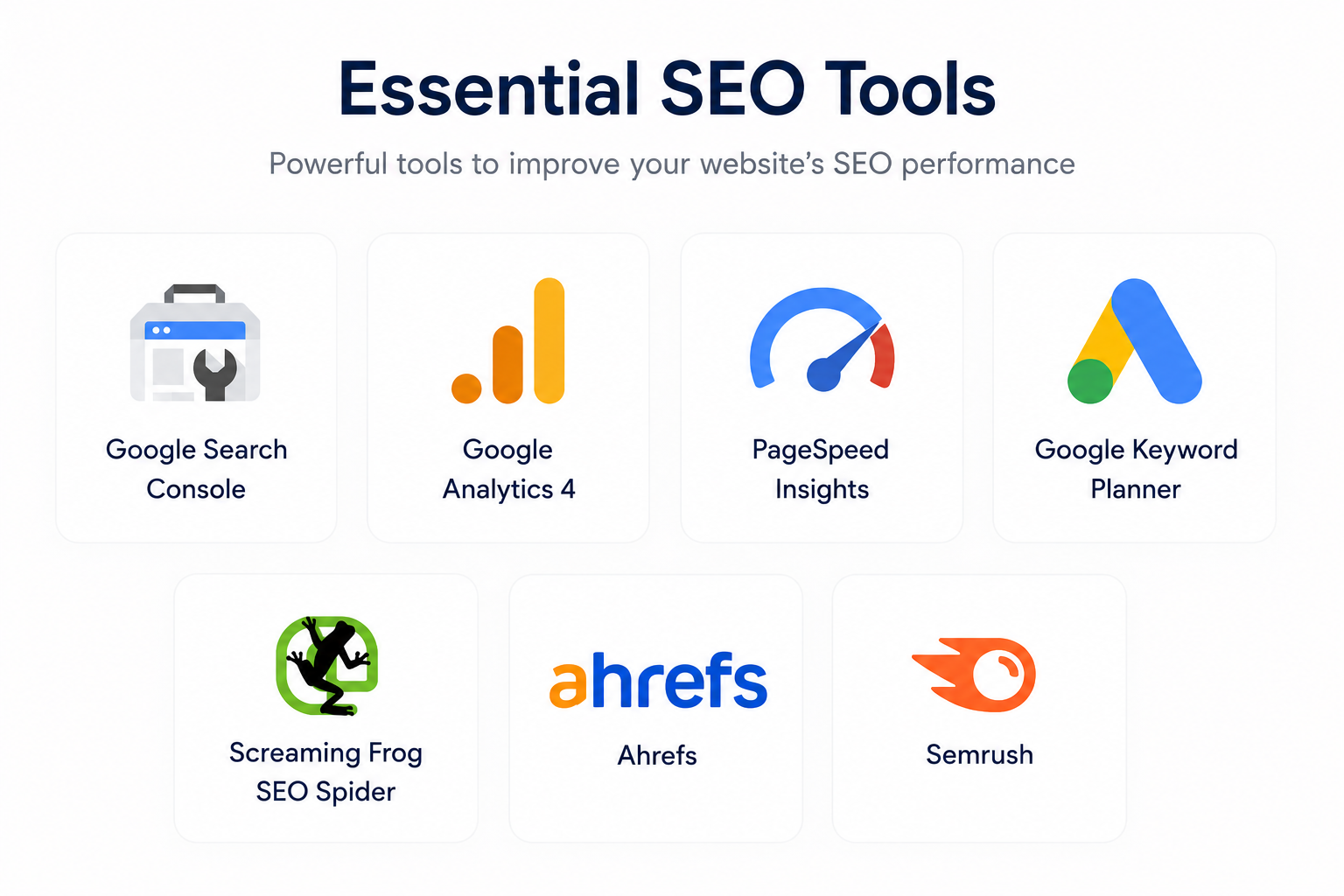
Google Search Console
Google Search Console should be the first tool every website owner sets up. It shows how Google crawls and indexes your website, reports technical issues, identifies pages that aren't indexed, and provides valuable data about search impressions, clicks, click-through rates, and average rankings. It also allows you to submit XML sitemaps and request indexing for newly published pages.
Google Analytics 4 (GA4)
Google Analytics helps you understand what visitors do after they arrive on your website. You can analyze traffic sources, user engagement, popular pages, session duration, and conversion events. While Search Console focuses on search performance, Analytics reveals how people interact with your content once they visit.
PageSpeed Insights
PageSpeed Insights evaluates your website's loading performance on both desktop and mobile devices. It reports Core Web Vitals, highlights performance issues, and provides recommendations such as image optimization, code minification, and reducing unused resources. Improving these areas can create a better experience for visitors.
Google Keyword Planner
Keyword Planner helps you discover search terms people use on Google. It provides estimated search volume, competition levels, and related keyword ideas that can help you identify topics worth covering. While primarily designed for advertising, it's also useful for basic keyword research.
Screaming Frog SEO Spider
Screaming Frog crawls your website in a similar way to search engines. It identifies broken links, duplicate titles, missing meta descriptions, redirect chains, orphan pages, oversized images, and many other technical SEO issues. It's especially useful for auditing medium and large websites.
Ahrefs
Ahrefs is widely used for backlink analysis, competitor research, keyword tracking, and content gap analysis. It allows you to understand which websites link to your competitors, discover new keyword opportunities, and monitor your website's overall SEO performance over time.
Semrush
Semrush provides a comprehensive collection of SEO, content marketing, competitor research, and technical auditing tools. Many businesses use it to monitor rankings, perform website audits, analyze competitors, discover keyword opportunities, and improve their overall search strategy.
Choosing the Right Tool
No single SEO tool can solve every problem. Google Search Console and Google Analytics should be your starting point because they provide direct data from your own website. As your SEO strategy becomes more advanced, tools such as Ahrefs, Semrush, and Screaming Frog can help uncover opportunities and technical issues that free tools may not highlight as thoroughly.
Common SEO Myths That Hurt Rankings
SEO has been around for decades, and during that time countless myths have spread across blogs, forums, and social media. Unfortunately, following outdated advice often wastes time and can even damage your website's long-term performance. Search engines have evolved significantly, and strategies that once worked years ago may no longer be effective today.
Instead of chasing shortcuts, focus on understanding how modern search engines evaluate websites. Separating fact from fiction allows you to invest your time in improvements that genuinely benefit both users and your search visibility.
Myth 1: SEO Produces Instant Results
SEO is not an overnight strategy. Google needs time to discover, crawl, index, and evaluate your content before rankings improve. Depending on your competition and website authority, noticeable results may take several weeks or even months.
Focus on publishing consistently, improving your website, and measuring progress over time instead of expecting immediate rankings.
Myth 2: More Keywords Mean Better Rankings
Repeating the same keyword dozens of times doesn't help Google understand your content better. Modern search engines analyze context, related concepts, and overall topic relevance rather than simple keyword frequency.
Write naturally, use descriptive language, and focus on answering the user's question instead of forcing keywords into every paragraph.
Myth 3: Buying Backlinks Guarantees Higher Rankings
Purchasing large numbers of backlinks from low-quality websites may provide temporary gains, but it rarely leads to sustainable success. Google's algorithms are designed to identify unnatural linking patterns, and manipulative link-building strategies can create more problems than benefits.
High-quality backlinks earned through valuable content are far more effective than hundreds of artificial links.
Myth 4: Longer Articles Always Rank Better
Article length alone isn't a ranking factor. A concise article that completely answers a user's question can outperform a much longer article filled with repetitive or unnecessary information.
Write as much as the topic requires—no more and no less. Prioritize clarity and usefulness over word count.
Myth 5: AI-Generated Content Can Never Rank
Search engines evaluate the quality of content rather than how it was created. Content produced with AI can rank if it's accurate, original, helpful, and reviewed carefully. Poor-quality content written solely for search engines is unlikely to perform well regardless of whether it was created by a human or AI.
Treat AI as a productivity tool, not a replacement for expertise, editing, and fact-checking.
Myth 6: Google Only Cares About Keywords
Keywords help Google understand a page's topic, but they're only one part of SEO. Content quality, search intent, page experience, website authority, technical health, internal linking, and user satisfaction all influence rankings.
Successful SEO comes from improving your entire website rather than focusing on one ranking factor.
Myth 7: Publishing More Articles Automatically Improves SEO
Publishing dozens of low-quality articles won't outperform a smaller collection of outstanding resources. Every page should provide genuine value and contribute to your website's topical authority.
Focus on solving real problems, updating existing content, and creating resources readers will actually bookmark and share.
Best Practices to Improve Google Rankings
There isn't a single SEO technique that guarantees first-page rankings. Websites that consistently perform well in Google usually succeed because they follow a combination of good practices over a long period of time. Instead of looking for shortcuts, focus on building a website that genuinely deserves to rank by providing value, maintaining technical quality, and continuously improving your content.
The following best practices are suitable for both new and established websites. While none of them produce instant results on their own, together they create a strong foundation for long-term organic growth.
Focus on Search Intent
Before creating any article, understand what users actually want when they search for a keyword. Someone looking for a tutorial expects step-by-step instructions, while someone searching for a comparison expects detailed side-by-side analysis. Matching search intent is one of the most effective ways to improve rankings.
Publish Helpful, Original Content
Every article should solve a real problem or answer a meaningful question. Instead of repeating information available everywhere else, add practical examples, screenshots, case studies, templates, or insights that make your content more valuable than competing pages.
Update Existing Content
SEO doesn't stop after publishing. Review important articles regularly and update outdated information, broken links, screenshots, statistics, and recommendations. Fresh, accurate content is more useful for readers and easier for search engines to trust.
Improve Website Performance
Fast-loading pages, responsive layouts, optimized images, and reliable hosting contribute to a better browsing experience. Visitors are more likely to stay on websites that load quickly and work well across all devices.
Build Strong Internal Linking
Connect related articles using descriptive anchor text. A well-structured network of internal links helps visitors discover more content while helping Google understand the relationships between your pages.
Build Topical Authority
Rather than covering dozens of unrelated subjects, focus on becoming an expert within a specific niche. Publishing multiple high-quality articles around one topic helps establish authority and improves your chances of ranking for competitive keywords over time.
Measure and Improve Continuously
Use tools such as Google Search Console and Google Analytics to monitor impressions, clicks, traffic, indexing status, and technical issues. Regular analysis helps you discover what's working and where further improvements are needed.
| Best Practice | Why It Matters |
|---|---|
| Match Search Intent | Gives users the information they expect to find. |
| Create Helpful Content | Encourages trust, engagement, and sharing. |
| Update Existing Articles | Keeps content accurate and competitive. |
| Improve Performance | Creates a better experience for visitors. |
| Strengthen Internal Links | Helps Google discover and understand your content. |
| Build Topical Authority | Increases credibility within your niche. |
| Track Performance | Helps identify opportunities for continuous improvement. |
Getting Your Website Back on Track
If your website isn't ranking on Google today, don't assume it's destined to stay that way. Almost every successful website has gone through a period of low visibility before gradually earning trust, authority, and consistent organic traffic. The difference between websites that eventually rank and those that disappear is usually persistence, continuous improvement, and a willingness to focus on what genuinely helps users.
Throughout this guide, you've seen that ranking problems rarely come from a single mistake. A page might struggle because it targets the wrong keyword, lacks useful information, has technical issues, weak internal linking, or simply competes against stronger websites. Instead of searching for one magic solution, improve your website step by step. Small improvements across multiple areas often produce much better results than trying to optimize only one ranking factor.
Make it a habit to review your content regularly, update outdated information, monitor Google Search Console, improve page speed, strengthen internal links, and continue publishing articles that answer real questions people are searching for. Every high-quality page becomes another opportunity to attract visitors, build topical authority, and earn Google's trust.
Remember that SEO isn't about trying to outsmart Google's algorithms. Google's goal is the same as yours—to help users find the most useful answer. When your website consistently provides accurate information, solves real problems, loads quickly, and offers a great user experience, you're naturally moving in the same direction as Google's ranking systems.
Don't become discouraged if rankings improve slowly. Organic search growth is usually gradual rather than dramatic. Track your progress using meaningful metrics such as indexed pages, impressions, clicks, and organic traffic instead of focusing only on daily ranking fluctuations. Over time, these small improvements compound into significant long-term growth.
The most successful websites aren't necessarily the ones with the biggest budgets or the largest teams. They're the ones that consistently publish valuable content, learn from performance data, adapt to changes, and continue improving long after the initial launch. If you commit to that mindset, your website will be in a much stronger position to compete in search results.
A Simple SEO Action Plan
- ✅ Confirm that your important pages are indexed by Google.
- ✅ Target keywords that match user search intent.
- ✅ Create original content that solves real problems.
- ✅ Improve website speed, mobile usability, and technical SEO.
- ✅ Optimize titles, headings, images, and internal links.
- ✅ Build topical authority by publishing related content consistently.
- ✅ Monitor performance with Google Search Console and Google Analytics.
- ✅ Continue improving your website instead of looking for SEO shortcuts.
SEO rewards consistency, patience, and usefulness. Every improvement you make today strengthens your website for tomorrow. Focus on helping your audience better than anyone else, and over time you'll build a website that's not only more visible in Google Search but also more valuable to every visitor who finds it.
Keep Improving Your SEO Skills
Search engine optimization isn't something you master after reading a single article. Google's search systems continue to evolve, user expectations change, and competitors constantly improve their websites. The good news is that the core principle rarely changes: websites that consistently provide helpful, trustworthy, and easy-to-use content are far more likely to earn long-term visibility.
As you improve your website, don't try to implement everything at once. Choose one area, make measurable improvements, monitor the results, and then move to the next opportunity. Small improvements made consistently often produce much larger results than major redesigns completed only once every few years.
Continue learning about keyword research, technical SEO, website performance, content strategy, structured data, internal linking, and user experience. Every new skill strengthens your ability to build websites that both people and search engines appreciate.
The websites that achieve lasting success aren't necessarily the biggest or oldest—they're the ones that never stop improving.